Free up an editor licence
Every account that may edit with DXPR Builder uses a licence. The User Licenses tab lists these accounts for every site on your product key. Here you exclude an account from editing to free its licence, give editing back, and clear records of people who left. How licences are counted is explained in Keep your editors within your licence.
Before you start
- Your role needs Administer DXPR Builder configuration.
- Save your product key under General settings.
Set up
To exclude an account from editing:
- Go to DXPR Studio > DXPR Builder > User Licenses
(
/admin/dxpr_studio/dxpr_builder/user_licenses). - Find the person's email address in the User column.
- Click Exclude from editing in the Operations column.
- Click Confirm.
The account keeps its roles and content. It can no longer open the builder, and its licence becomes free 30 days later.
Give editing back
- Click Enable editing in the Operations column. The person's account form opens.
- In the DXPR Builder section, untick Exclude from DXPR builder editing.
- Click Save.
The message "This user now uses 1 DXPR Builder user license" confirms it.
Clear the record of someone who left
Delete license data appears when no account on this site uses that email address. Click it, then Confirm. The record goes from every site on your product key; no Drupal account is deleted. The table also lists editors of your other sites, so use this only for people who no longer edit anywhere.
What you see
The box at the top is named after your tier, for example DXPR user licensing (Enterprise). It counts DXPR Builder users and shows Licenses used out of your limit. The table below has the columns User, Roles, Sites, Assigned and Operations. Click a Sites link, such as 2 sites, to see where that person edits.
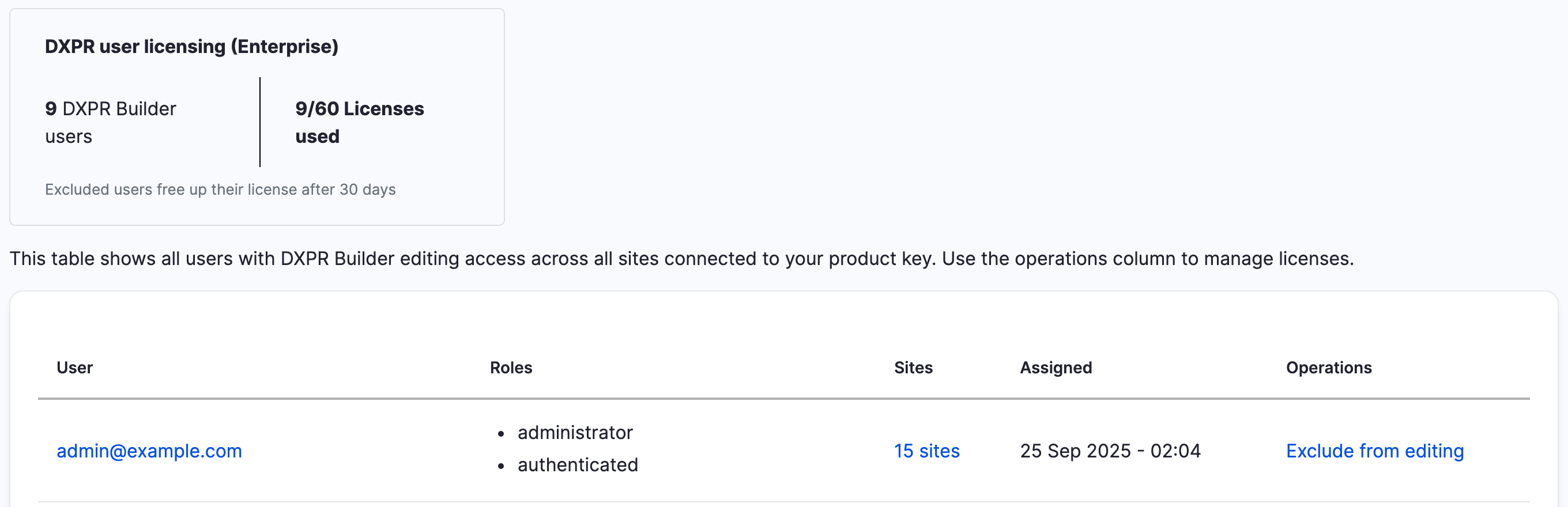
After you exclude someone, their row offers Enable editing. While a freed licence waits out its 30 days, a message names the date: "Next license available on".
If you don't see the change
- The Operations column shows "Can be excluded in N days". The licence was assigned less than 30 days ago. Wait until the days have passed, then exclude the account.
- The box shows 0 DXPR Builder users while your site has
editors. DXPR.com counts editors that your site sends it. Opening
this tab sends any editor it has not counted yet, for example after
a Drush install or a product key set in
settings.php. If a warning says DXPR.com "has not counted" some accounts, they could not be sent: check that the site can reach dxpr.com, then reload the tab after a few minutes. - There is no licence box above the table. No product key is
saved, or the site could not reach DXPR. Save the key under
General Settings (
/admin/dxpr_studio/dxpr_builder/settings). - A row offers Delete license data instead of Exclude from editing. That person has no account on this site with this email address. If they edit on another of your sites, exclude them there.
- "The user with the provided email exists in the system." An account on this site uses that address. Exclude the account instead.
- An editor sees "there are insufficient User licenses". More accounts may edit than your subscription covers. Exclude accounts here, or add users to your subscription at dxpr.com.
What's next?
- Keep your editors within your licence: what counts as a licence.
- Multi-site licensing: one product key on several sites.
- User profiles: give each editing role its own set of tools.