Clone a site
Create a new site from an existing one: its settings, and its content and menu links as its cloning rules say. The examples start the valve brand Velmora from Hydrion.
Needs Sites clone
Part of Sites clone.
Before you start
- The permission Administer sites.
- The module:
composer require drupal/sites_clone, thendrush en sites_clone. - A source site created in the admin UI. A site defined in code cannot be cloned: its Clone form answers "Page not found".
Clone
- Open the source site's dashboard, here Hydrion's, and click the Clone tab, or choose Clone among the site's operations on Sites.
- Enter the Site name, like
Velmora. The ID derives from it. - Enter the clone's Hostname, like
www.velmora.example, or the Main site and Path prefix of a sub-site. The structure and the address start as the source's: a sub-site with a hostname of its own clones to one with a hostname of its own. - With Sites language, a main site that speaks several languages also asks for Languages: untick those the clone does not speak, and choose its Default language.
- Open Content. Choose a clone method per content type, like Clone content for basic pages and Ignore content for articles, and whether to Copy the links of this site’s menus.
- Click Clone site.
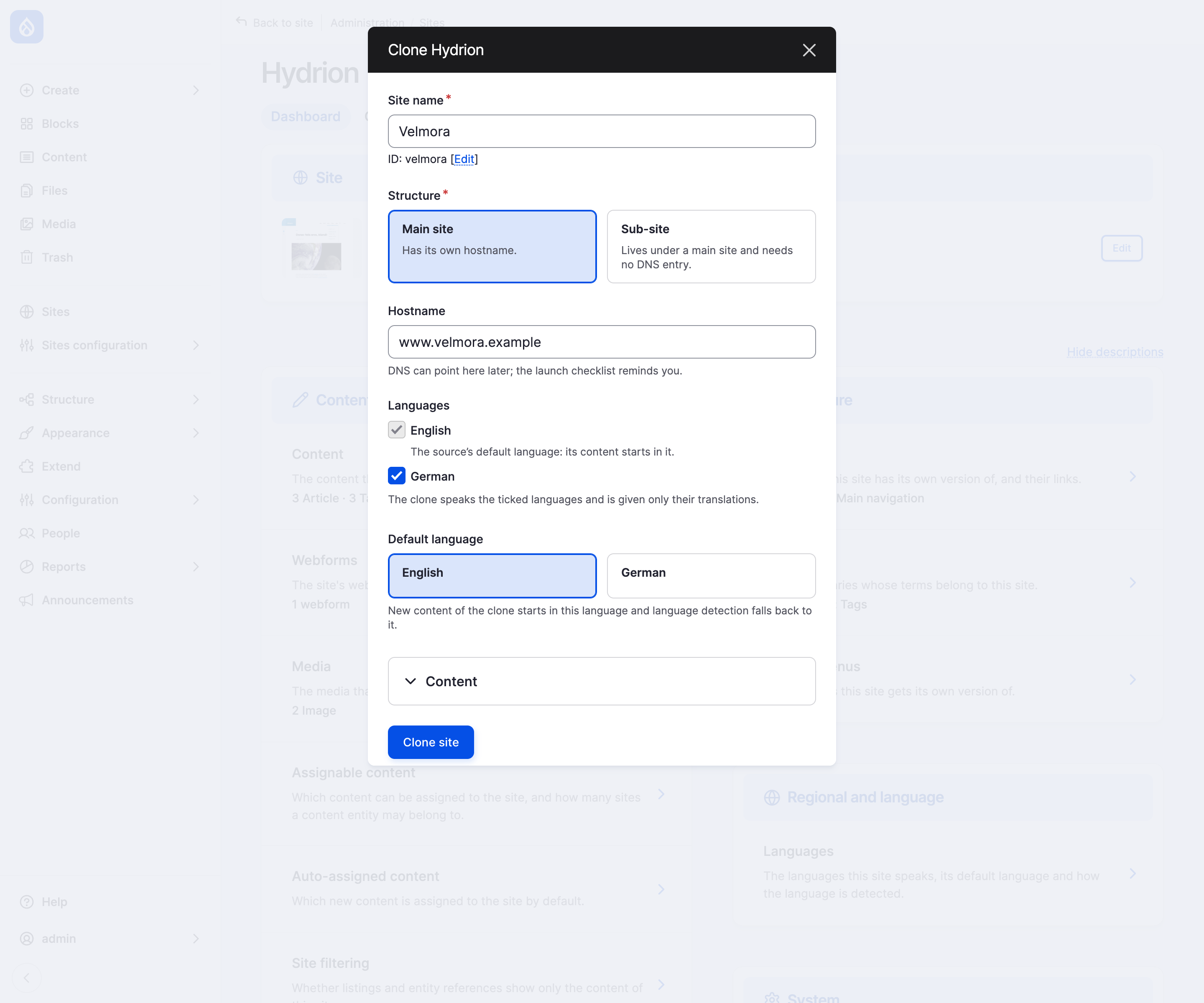
The clone dialog of Hydrion, filled in for Velmora.
A batch copies the content and the menu links and points the clone's front, 403 and 404 pages at the copies. It copies an entity type after the entity types its fields reference, so a page's tags, media and author exist before the page; where no reference decides, the order of the site's content map stands. Velmora starts with its own copies of About Hydrion and Contact, to rewrite, and none of Hydrion's articles. You land on the clone's dashboard. The clone starts disabled, like a new site. drush sites:clone asks the same questions (Drush).
Clone methods
| Method | The clone gets |
|---|---|
| Ignore content | None of the items of this type. |
| Share content | The same items, shared with the source. Their origin site stays. |
| Clone content | Copies of its own. Share these instead of copying them names items to share instead, like an error page. Not offered for users. |
A menu link to a copied item points at the copy; every other link is copied as it is, in its place in the menu.
What the clone gets
The clone gets the source's site type and settings, and its per-site configuration, like the site information, in every language and environment. Name, ID and address are the ones given in the form.
These belong to one site and are not copied:
- hostnames per environment, hostname aliases, language domains and the URL language source;
- per-site role assignments;
- redirects and content overrides.
Cloning rules
Each site's Cloning rules section, a card in the Settings group of its dashboard, holds a method per content type and the menu-link choice; the clone form starts from them. It takes Manage site settings. The site type sets the defaults; without one, content is Ignore content and menu links are copied. The form skips a rule the site type does not make available to its sites; the type's value applies.
Last updated 2026-11-02