Site types
Create a site type and decide what the sites built from it offer.
Every site is built from a site type. A type is configuration: it deploys with the rest of your configuration. The sites themselves are content, created on each environment. Valtora builds its group site from Corporate site, Hydrion and Torqline from Brand site, and Hydrion's country sites from Regional site.
What a type decides
The type form lists its settings as areas, one per section the settings belong to, like Identity, Site information, Appearance or Assignable content, grouped as the site dashboard groups its cards: Content, Structure, Search and metadata, Regional and language, People, System and Settings. A badge next to an area's name sums up what it does, like Preset value or Value per environment; No value per site marks an area whose settings no site changes. Edit opens one area at a time: its matrix, one row per setting, and the preset values below the rows. Apply takes the changes over until the form is saved, Cancel drops them. Find a setting opens the area of a setting typed into it.
Each row has six columns:
| Column | Effect when checked |
|---|---|
| Value per site | Sites of the type get a field for the setting and set their own value. Unchecked, sites do not see it; the preset applies, if there is one. A checked, disabled box marks a setting every site needs. |
| Value per environment | The value may differ per environment, on the Environments tab of the site's section. |
| Value per language | The value may differ per language, on the Translate tab of the site's section. |
| Inherited value | Sites take the value from the site they inherit from until they set their own: the site chosen on their Inheritance section, else a sub-site's main site. A site's identity and its secrets are never inherited. |
| Editable inherited value | Sites may replace an inherited value. Unchecked, the inherited value applies and the field is read-only. |
| Preset value | Sites of the type start with the value entered below the row, even where they have no value per site. |
A column that needs another stays disabled until that one is checked; a ❌ marks a column the setting does not support. What the columns and cells mean (Legend) explains them on the form. How these layers combine is on Setting layers; every setting is listed in the settings reference.
Structure says what the sites of the type are: Main sites and sub-sites, Main sites only or Sub-sites only. Add site offers Sub-site while a type allows sub-sites, and under each structure only the types that allow it. A site keeps the structure it was created with. Valtora's Corporate site and Brand site are main sites only, Regional site is sub-sites only.
Two groups of rows decide what the sites hold and who works on them:
- Assignable content: one row per content type, like Content: Article, Taxonomy term: Tags or User. The value is Unlimited sites, Single site or Not assignable: how many sites one item of that type can belong to. Without a default from the type, taxonomy terms belong to a single site and everything else to unlimited sites. See Content on sites.
- Assignable roles: one row per role. A role the type offers can be granted on its sites, on one site at a time. See Roles and permissions.
A changed default applies at once to every site of the type that has no value of its own for that setting.
Create a site type
Before you start
You need the Administer sites configuration permission.
Steps
- Go to Sites configuration > Site types (
/admin/sites/types). - Click Add site type.
- Enter a Label, like
Brand site. The machine name follows it (brand) and cannot change later. - Enter a Description, like
A brand of the group, on its own domain.It is shown when someone chooses a type on Add site. - Select the Base site plugin: Content site for sites created and managed in the admin UI. It cannot change later.
- Under Structure, choose Main sites and sub-sites, Main sites only like Brand site, or Sub-sites only like Regional site.
- Click Edit on an area, like Assignable content. Check Preset value on each row the type should preset, then enter the value below the row.
- Set Value per site, Value per environment, Value per language, Inherited value and Editable inherited value per row, then click Apply. Open the next area the same way.
- Click Save.
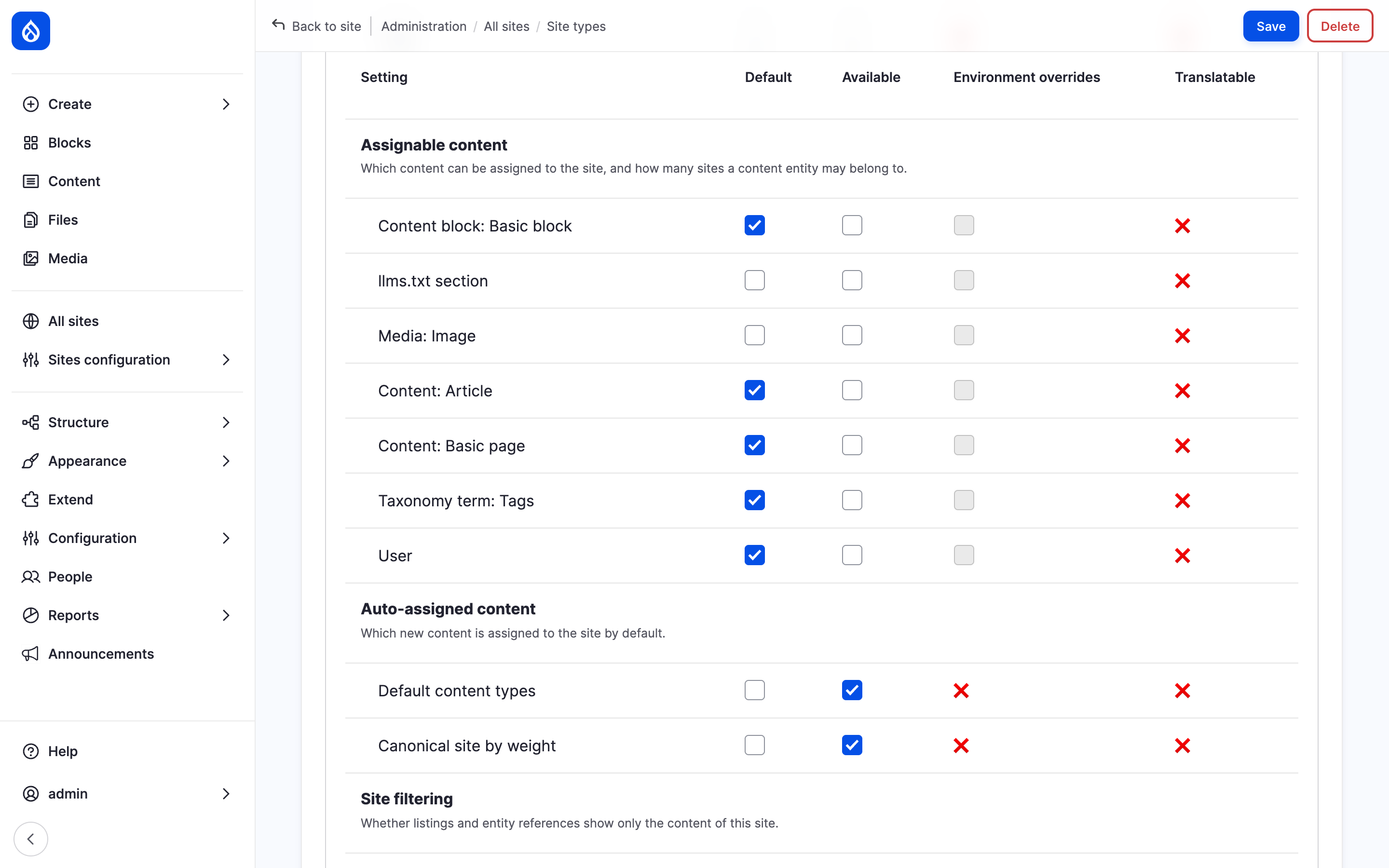
The settings of the Brand site type as an overview of areas.
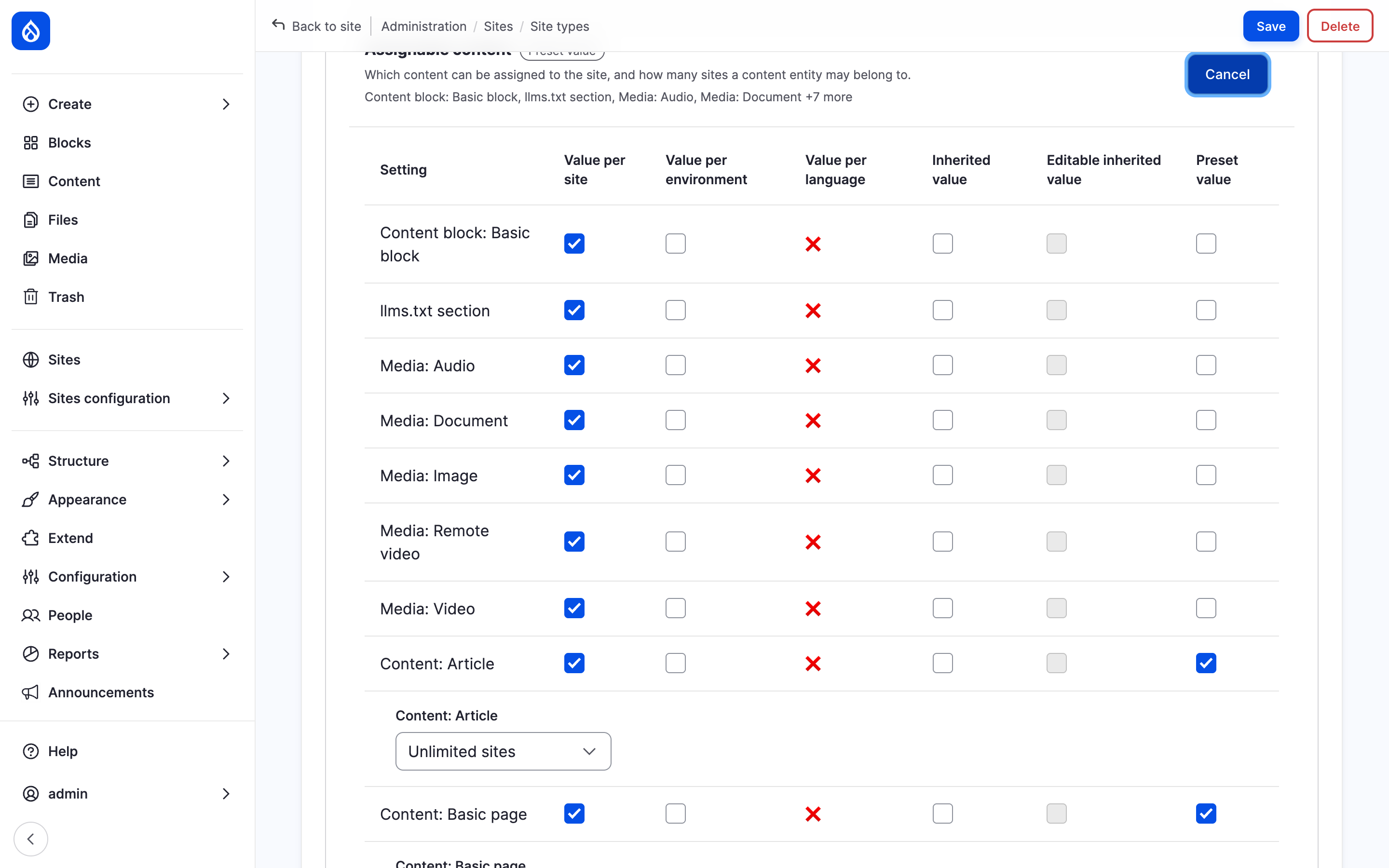
The Assignable content area opened with Edit.
The list at /admin/sites/types shows each type's label, machine name and
base plugin. Edit changes a type. Delete works only while no site uses
the type.
An install without a site type
The modules alone create no site type. Until one exists, Add site
(/admin/sites/add-site) shows "No site type exists yet." with a link to add
one, and no site can be created. The hub and its administration work as
usual. The Content sites recipe adds a type named Site; see
Installation.
Last updated 2026-11-02