
History and saved versions
What it does
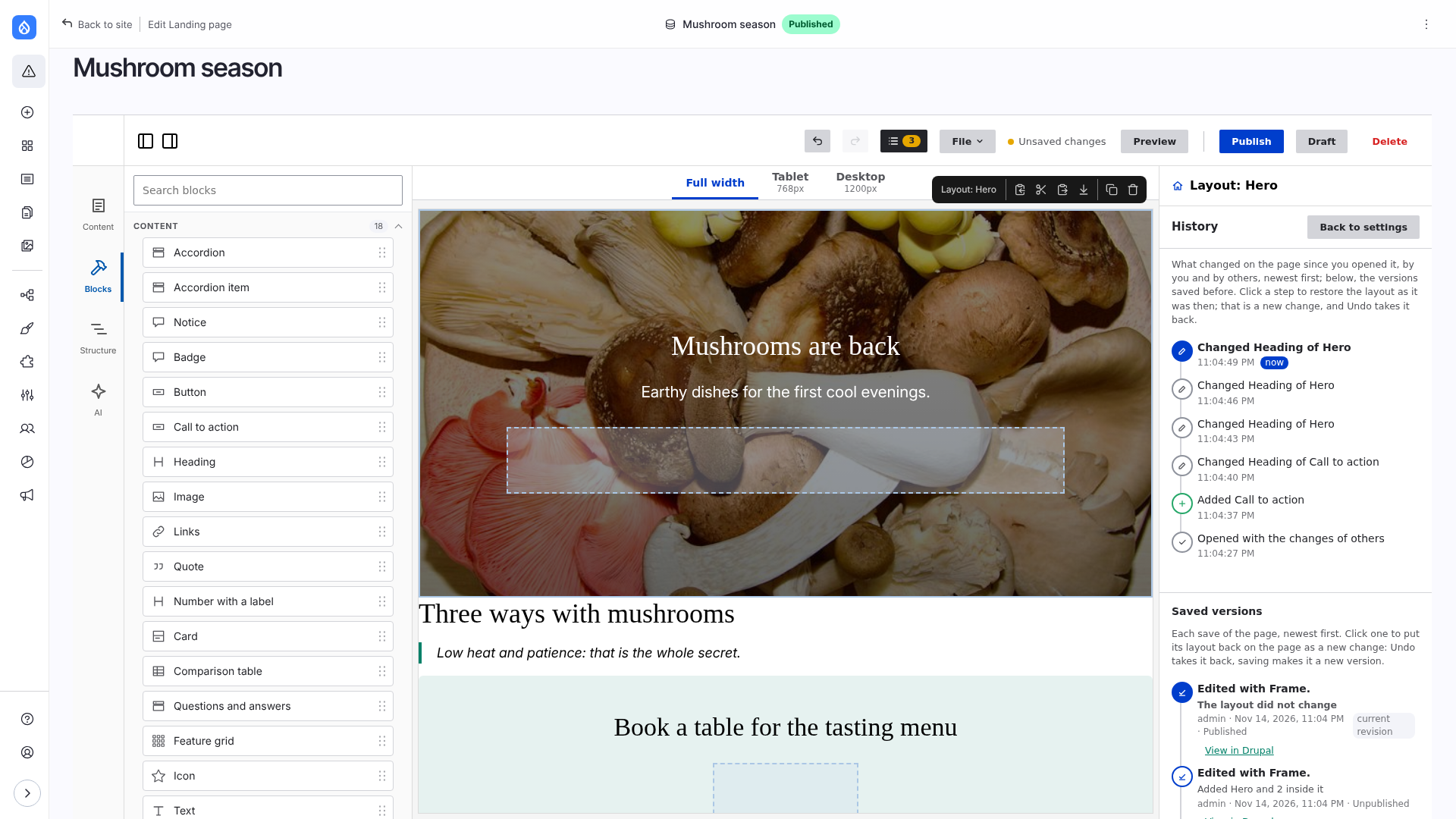
Undo, Redo and History are in the top bar, one joined group of three buttons (labelled "History") that stays together. The History has two tabs. Steps is a timeline of the changes since the page was opened: yours, those of other editors (with their name and colour) and the saves. A click on a line puts the layout back as it was then, as a new change, which Undo takes back.
Saved versions lists the revisions of the page in the language edited (the other languages have their own), newest first, with a count: the revision log message, who saved it, when, its state and what changed in that save. The revision that is live is marked Active. The version that is on the page is selected, with a background (aria-current): at first the newest one. A click opens a read-only preview of the page as it looked then, at the widths of the theme's breakpoints. The bar above it says "Version of (date) by (author)" and has Restore this version (puts that layout on the page as a new change: Undo takes it back, saving makes it a new version), Open in Drupal (the revision page of Drupal, for who may see revisions) and Close. Escape closes the preview. A restored version that is not saved yet is explained by a note above the list (Version from 14:05 is on the page. It is not saved yet: Publish or Draft to keep it, Undo to go back.); saving makes it a new version and the note goes.
In the video: changes, Undo and Redo, a line of the History restored, the page previewed at phone and tablet widths, Publish; then an older revision previewed and put back.
Limitations
- History covers the layout, not the node form: undo a field in the field.
- It is kept in memory, at most 50 lines. A reload starts it again with one line ("Opened"); the layout itself comes back.
- Undo and Redo take back only your own changes; the changes of others stay.
- A click on an older line does not go back in time for everyone: it is a new change of yours, so the work of others after it is not lost.
- A revision that changed only fields of the node form shows "The layout did not change".
- Open in Drupal on a saved version is there only for who may see revisions.
- A preview of a version shows the layout and the field values of that revision, in the language edited, and the paragraphs of that revision. It does not show later changes of the page, nor unsaved ones.
- What a revision refers to is shown as it is now: a block of the library or a preset that was changed after the version was saved looks as changed; so do views, menus and media. Only the page itself is as it was.
- Templates and saved blocks have no revisions here: their History is the steps of the editor.
Good to know
- Each line says what changed: the items, the props, the component. Typing in one field is one line; what one editor does in a row, within 10 seconds, is one line.
- The History button counts the changes since the last save.
- The revision log message typed in the page settings is the message of the revision that holds the layout.
- Revisions are Drupal's: content moderation and the revisions tab of the page work as usual.
How it works: Architecture: editing together.