
Fields and Drupal blocks
What it does
The Fields group of the Blocks panel has the fields of the page, the Blocks group the blocks of Drupal. Place them among the components, in any slot.
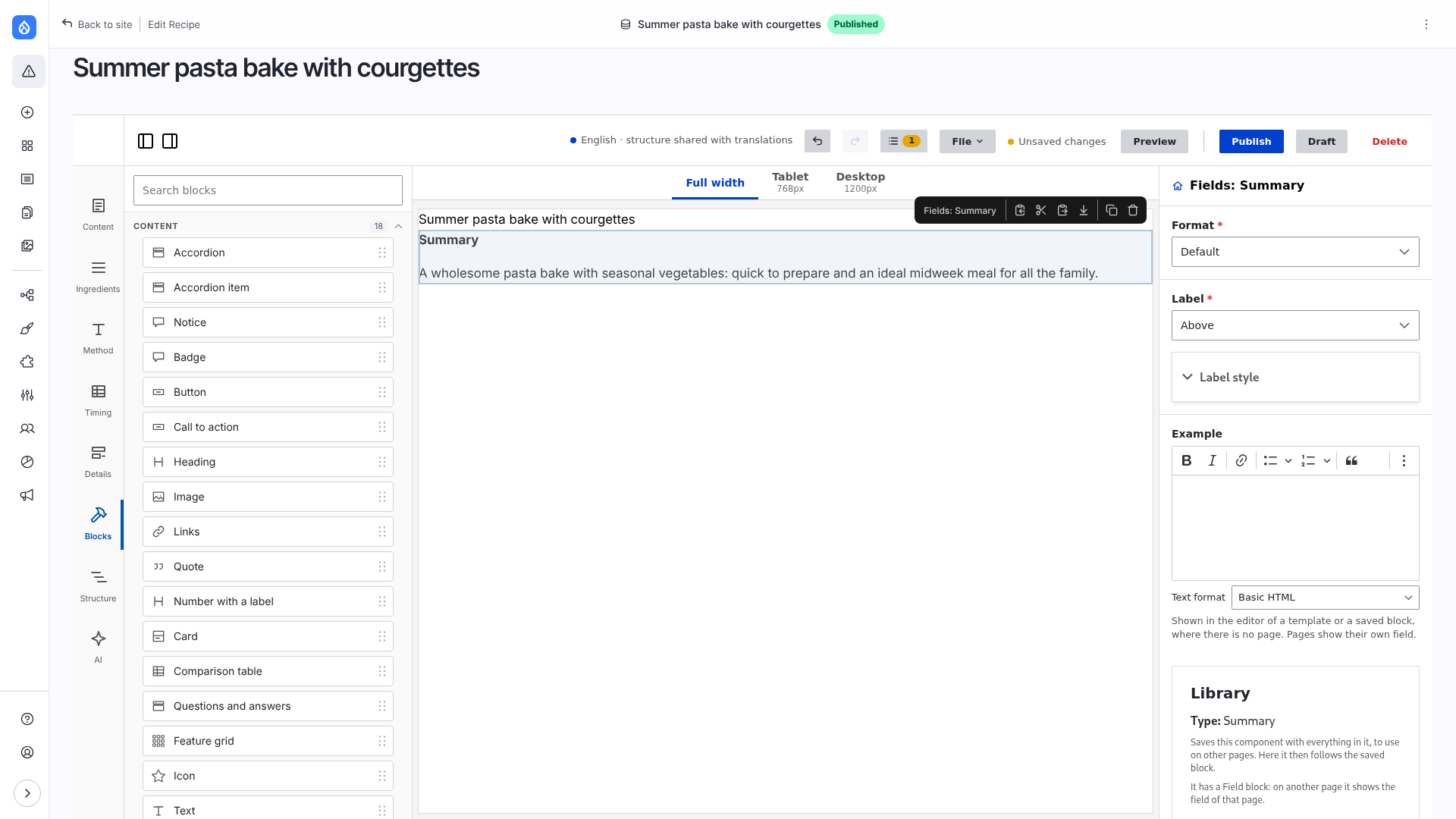
- A Field block shows one field of the page with a formatter and a label position. It starts with the format the content type uses in its default display (a media reference shows the image, not the name of the media item). The settings of the formatter open under it and apply as you change them. Its Label style sets the size, weight, case, line height and colour of the label alone.
- A Drupal block has an optional title (tokens allowed) and, when its plugin has one, its own settings form, as on the block layout page. A block that needs the page gets it as its context.
A field with many values can show each value as a component: see Fields with many values.
Both have Layout and style like any component.
Limitations
- Blocks that need a context other than the page (a user, a language, a string) are not offered.
- The components that UI Patterns offers as blocks are not offered: the components of the theme are in the panel already.
- The settings form of a block is built for the block layout page; a form that needs more room may not work well in the narrow right column.
- Settings of a block are not translated (only the title is), and the AI assistant neither sees nor changes them.
- Without core's HTMX (before Drupal 11.2) the settings of a formatter or a block open in a dialog with an Apply button.
- The settings of a field's format are offered for content, terms, users and media, also on a display.
- In a template or a saved block there is no page: a Field block shows its Example (text or an image, set in its form). When the Example is empty, Drupal's sample value of the field is shown (see below). The label of the field is shown as the block says (above, inline, hidden).
- In the editor of a display there is no Example field. The block shows the latest content of the bundle, else the sample values below.
What a Field block shows without a page
The values are the sample values of Drupal: every field type makes its own (generateSampleItems(), the code that devel_generate uses). They are shown by the real formatter, so its settings apply. The text is random, and it changes from one rendering to the next.
| Field type | What it shows |
|---|---|
| Text, number, boolean, list, email, link, date, date range, timestamp | the sample value of the type, through the formatter |
| Image, media image | a grey placeholder image (4:3, the size of the image style) |
| File | a link "document.pdf" |
| Reference | the first entities you may view and the field can refer to; none yet: "Example term", "Example page", "Example user" |
| A type whose sample value fails (some contributed types) | a value made by the module for core types, else the label of the field |
A field with many values shows three. Images and files are not made by Drupal's sample value: it writes a real file to the public file system every time, so an editor would fill the site with files. They are a grey image (a file of the module, modules/frame_editor/images/placeholder.svg) and a link. No content and no file is created for an example. A page never shows an example: it shows its field, or nothing.
Good to know
- Tokens typed into a field value are replaced too.
- A field or block without a root element of its own gets a wrapping
<div>when a layout or style value is set. - Core's field template has no classes, so the editor wraps a field in
.frame-editor-fieldand styles the label by its position. A theme with its own field template keeps it. See Tokens, features and styling: Field labels. - What is stored and rendered: Architecture: Drupal blocks.