The compliance report
The report lists the effective AI disclosure of every node the viewer is
allowed to see, for Article 50 compliance review. It lives under Reports, at
/admin/reports/ai-disclosure, behind the access ai disclosure report
permission: an unpublished node stays out of the report for anyone without
permission to view it, the same as everywhere else in the site.
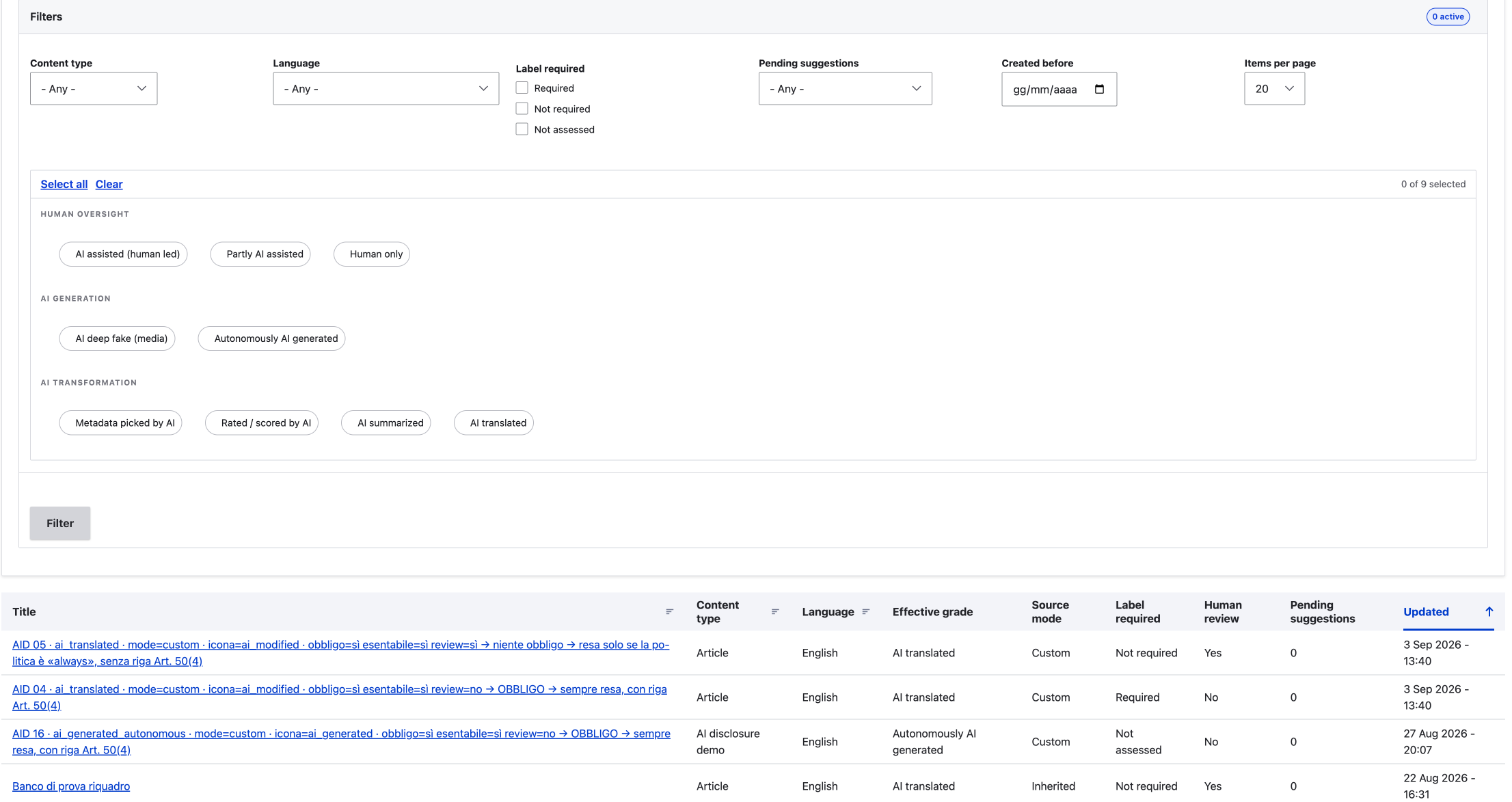
Each row shows the node's title, content type, language, effective grade, source mode (inherit, none, profile, custom), the verdict on the label, the human review flag, and the count of pending suggestions. The verdict is "Required", "Not required" or "Not assessed": the third is not a polite no, it means an answer is still missing that would change the outcome. That is the assessment debt, and answering on the profile clears a whole bundle of it at once. The columns come from the resolver's precedence rules rewritten as SQL, so the report matches what the reader-facing formatter decides, inherit mode included.
Filters
The exposed filters are the ones of Drupal's own admin listings, followed by "Filter" and "Reset". In order: title, content type, language (on a multilingual site), the effective grade, the label verdict ("Required", "Not required" or "Not assessed") and pending suggestions. Title is a text field that keeps the rows whose title contains the text. The others are single selects that start on "- Any -".
The table shows 50 rows a page, with a pager, and has no page size control. Dates use the short format, as on the content listing.
Configuration notices
A details element above the table lists two kinds of findings:
- Ungraded surface: bundles without the disclosure field.
- Broken disclosure references: content pointing at a grade or profile that no longer exists.
CSV export
The export is a separate submodule, ai_disclosure_csv_export. Installing
ai_disclosure does not enable it, and without it the report has no export
command and no export display. Its own page,
The CSV export, shows the command and what
lands in the file.
Once it is enabled, the "Export to CSV" command in the footer, next to
the pager, offers two links: "Full" exports every row, "Filtered"
exports the rows the active filters match and names how many, from the
query's real total rather than the page shown. With no filter active the
two would export the same rows, so "Filtered" is disabled rather than
offered as a real choice, and carries no count: the number would be the
one "Full" exports, and the pager states it alongside. The
export streams as CSV with the same columns as the table. A title starting
with =, +, - or @ gets a leading apostrophe in the file, so a
spreadsheet application does not read it as a formula.
It is a view
The report ships as an optional view, ai_disclosure_report, requiring the
core node and views modules. A site can adjust columns, filters
and sorts in the Views UI like any other view. The grade, label required,
source mode, human review and pending suggestion fields and filters are the
module's own Views plugins and work in other views over node data too: the
"Pending suggestions" column is a count, computed per entity. It does not
show the suggestion rows themselves. For those, in every status, with their
grade, source and note, see the
suggestions listing, built on the module's own
ai_disclosure_suggestion Views base table rather than on node data.
Enabling ai_disclosure_csv_export adds the ai_disclosure_csv_export
display to this same view, and uninstalling it removes that display again. A
site that has edited the display loses those edits on uninstall. The display
carries the submodule's name rather than the rest_export_1 the Views UI
generates, so a REST export the site adds itself is never mistaken for this
one, in either direction.