What the reader sees
The ai_disclosure_default formatter renders, in this order:
- the official EU icon for the grade
- the grade's disclosure sentence
- the site's label notice when the label is required, and the undetermined notice when the site has not assessed the content
- an expandable "How was AI used?" section holding the description
- a link to the site's editorial statement, when the Policy tab carries one
- who or what team holds editorial responsibility for the content, when the profile or item records one
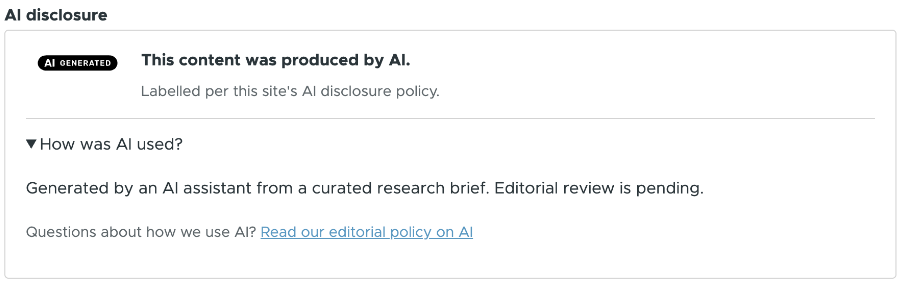
Which of these six parts shows is a per-grade setting: see What readers see. The checkboxes there hide a part when unchecked, except that a legally required label always keeps the icon and the sentence. Editorial responsibility is off by default on every grade: turning it on is the site's own choice to name someone, never a requirement this module asks for.
Content nobody has assessed
Article 50(4) applies to a piece of content only under the conditions the
scope assessment records. Until someone answers those
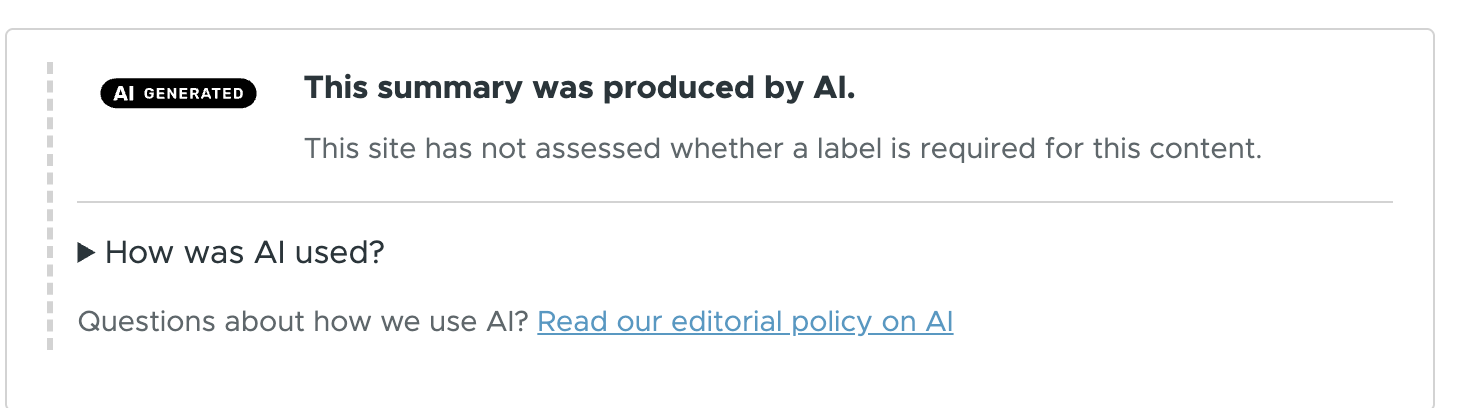
questions, the module holds the verdict open and says so on the page. The
legal line carries the undetermined notice from the Policy tab instead of the
label notice, and the card carries the ai-disclosure--undetermined class for
a theme to style.
Content the exemption covers
Text that a person reviewed, with a named editorial responsibility, is exempt under paragraph 2. The card then carries no legal line at all: the site is not claiming a label is due, because none is.

Whether this card appears is the site's decision, not the law's. A site set to disclose only when legally required shows nothing here. A site that discloses always shows the icon and the sentence, as above.
When the editorial responsibility is shown
The same content, on a grade whose "Editorial responsibility" visible part an administrator has switched on.
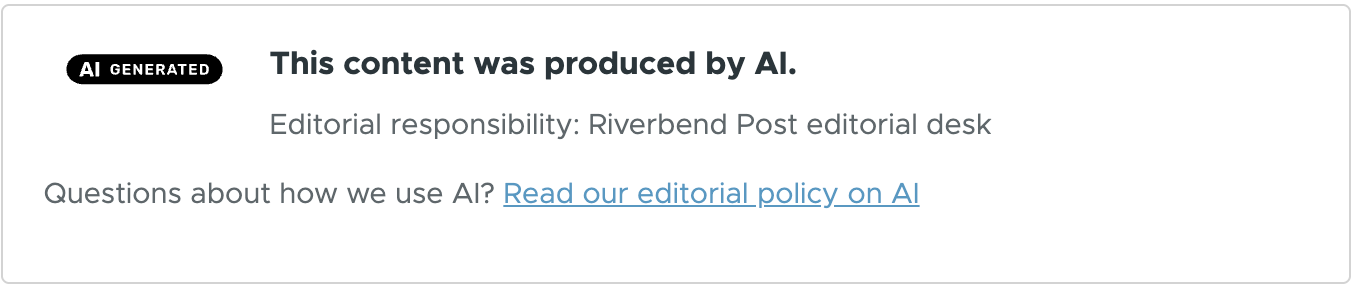
One line more, between the sentence and the statement link. The value was already recorded on the profile or the item: the checkbox decides only whether the reader sees it. It ships off on every grade, because what it shows can be the name of a natural person.
The non-invasive form
Paragraph 1 limits how the disclosure is made for a deep fake that forms part of a manifestly artistic work: it must not hamper the display or the enjoyment of the work. The card still discloses, in a smaller form. Nothing is hidden, nothing leaves the tab order, and a theme can override the form.
Display settings
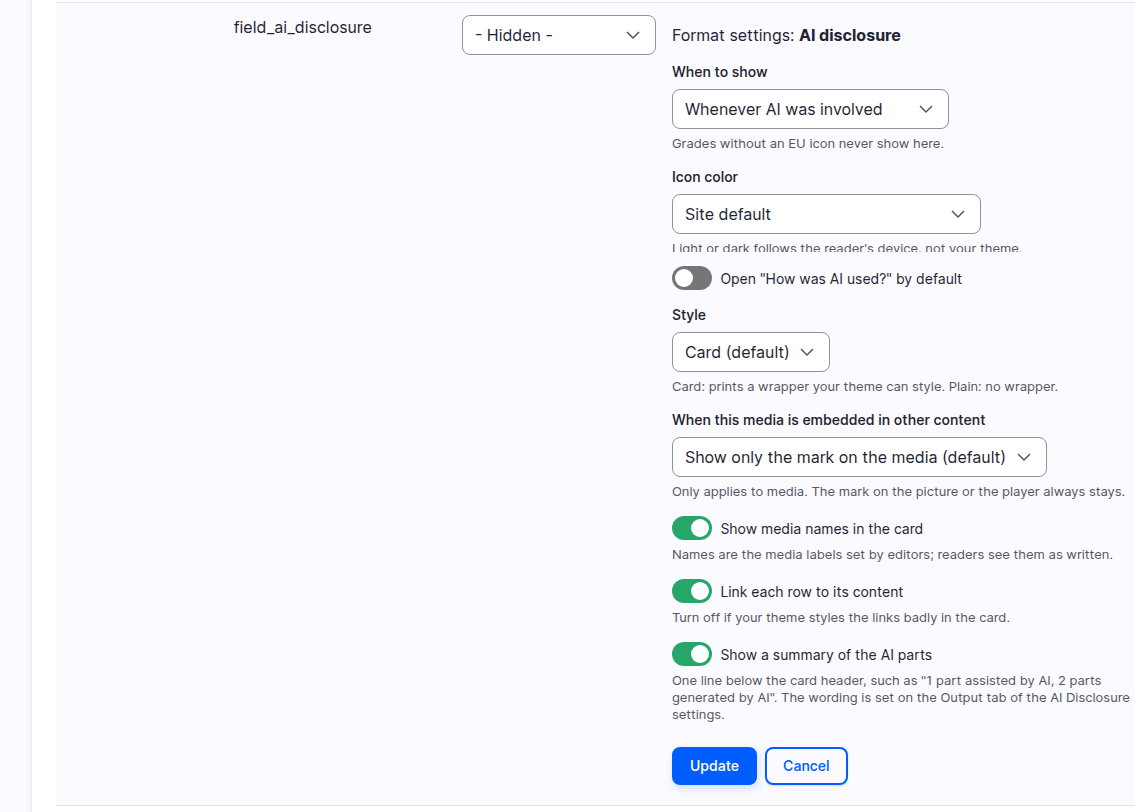
These settings sit on the field's row in Manage display, behind the gear.
| Setting | Values | Default |
|---|---|---|
| When to show | Site policy, Whenever AI was involved, Only where a label is required | Site policy |
| Icon color | Site default, Match reader's light or dark mode, Black, White, Black with no background, White with no background | Site default |
| Style | Card, Plain | Card |
| Open "How was AI used?" by default | on, off | off |
| When this media is embedded in other content | Show only the mark on the media, Also show the disclosure card | Show only the mark on the media |
| Show media names in the card | on, off | off |
| Link each row to its content | on, off | on |
| Show a summary of the AI parts | on, off | off |
The last three apply to the card of a page that holds several AI elements, see A page with several AI elements.
The same settings follow the field wherever it is displayed: on a field block placed with Layout Builder, and on the field in a view.
Media inside other content
A media item shown inside other content, either embedded in text or through a media reference field shown with the "Rendered entity" formatter, can show only its mark. The mark is the icon on the image or the video, or the label on the audio player. The card then does not repeat under the picture or the player. The card still shows on the media's own page, in the media library and in views that list media.
The formatter setting "When this media is embedded in other content" decides. "Show only the mark on the media" is the default of a new site. "Also show the disclosure card" keeps the card. Change it in Manage display of the media type.
Article 50(4): a deep fake must stay disclosed
A deep fake image, audio or video must be disclosed, with no exemption for human review. See Two paragraphs, not one rule. "Show only the mark on the media" removes the card of an embedded media item, so the mark is then its only disclosure. Where the mark is off, an embedded deep fake shows no disclosure at all. This happens to images when "Images with the icon" on the Media tab is "None". For every media type that can hold a deep fake, keep the card or turn the mark on.
To keep the card for one embed, a site builder adds a media view mode whose display uses "Also show the disclosure card", and adds that view mode to the allowed view modes of the text format's "Embed media" filter. Editors then pick it in the Embed media dialog.
Only media rendered by the "Rendered entity" formatter, or embedded in text shown with the default text formatter, are counted.
A page with several AI elements
The elements are the content's own disclosure, when it claims AI, and each embedded AI media item. What the reader sees below the content depends on how many of them are AI.
- One AI element, a media item in human text. No card below the content. The media item keeps its own mark.
- Only the content's text is AI. The content's own card.
- Two or more AI elements. One card below the content, when the one-card summary is on. It is the checkbox "Summarize the AI media of a page in one card" on the Output tab. It is on for new installs. To list embedded media items in the one card, set "When this media is embedded in other content" to "Show only the mark on the media" on each media type.
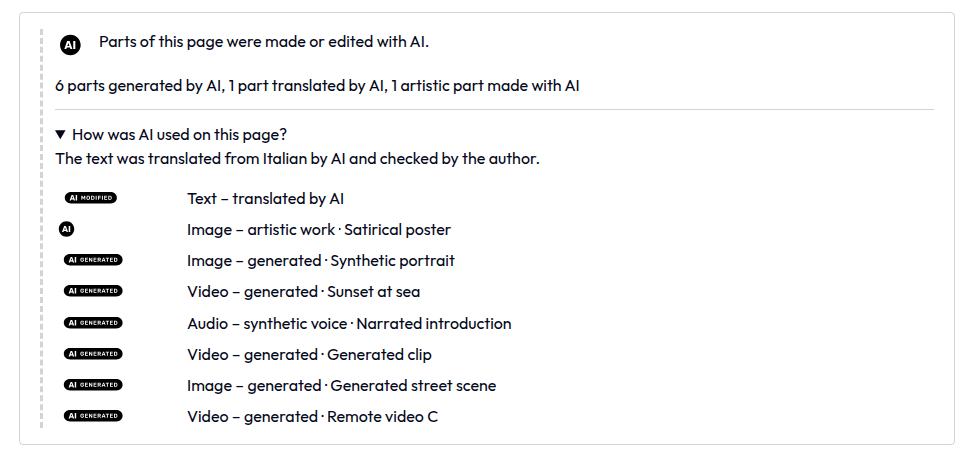
With the one-card summary on, the card holds the following.
- The header. When all elements share one classification (the same EU icon and the same artistic flag), the card shows that icon and sentence. When they differ, it shows the basic EU "AI" icon and a neutral sentence, in normal weight. The default is "Parts of this page were made or edited with AI." and the site can change it on the Output tab, and translate it.
- A summary line right below the header, with "Show a summary of the AI
parts": "1 part generated by AI, 2 parts assisted by AI". It is off by
default, on new and updated sites. The wording is site-wide, one text for one
part and one for several, per kind of AI use (generated, modified, assisted,
translated, summarized, artistic). Edit the texts in "Summary of the AI
parts" on the Output tab, and translate them on the Translate tab of the
settings. Each text must contain
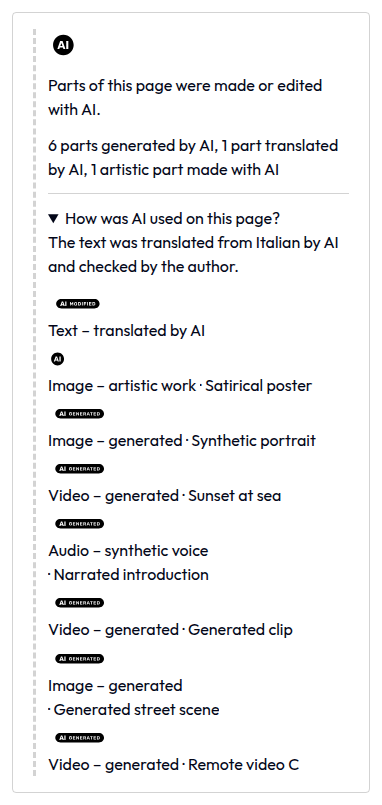
@count. The line is a paragraph with the classai-disclosure__parts. - The expandable part, with the content's own "How was AI used?" text first, then a list with one row per AI element: its own EU icon, what it is and a short phrase ("Video - generated"). Icons share one column, so all the row texts start at the same place. The summary reads "How was AI used on this page?" when the classifications differ.
- Links. The whole row is a link to the element on the page, with "Link each row to its content". It is on by default. Turn it off if your theme styles links badly in the card. The rows then show the same text without a link. The element a link leads to is outlined softly for about two seconds. The text row leads to the start of the text and shows a thin bar on its left that fades out.
- Names. "Show media names in the card" adds the name of each media item to its row. It is off by default.
- An evidently artistic work keeps the lighter mark it has elsewhere: a small basic EU "AI" icon next to the work, no overlay.
If the content has no disclosure card of its own, the card is placed with the other fields of the content.
On a narrow screen the icon of each row goes above its text.
The compact label under the title
For a text that needs a label under Article 50(4), a compact label (icon and sentence) can also show right under the title, where it is seen first. The full card below the content stays. The label is the "AI disclosure label" component in Manage display of bundles that have a disclosure field. It is hidden by default, on new and updated sites. Move it out of the Disabled region and place it to turn it on.
When anything appears at all
Three rules decide it.
A legally required label always appears, whatever the visibility setting says: Article 50(4) is not a display preference.
A card on content the site has not assessed also always appears. Suppressing it would tell the reader that no label is due, which is the one thing the site has not established.
Everything else appears only where the policy asks for it. "Site policy"
reads the site policy from the
Policy tab. A grade whose EU icon is
none stays silent even under "Whenever AI was involved": the Commission defines no
icon for it, and the editing widget already warns the editor that the reader
will see nothing.
Images
A deep fake image carries the icon on the image itself, not only in the card next to it. See Labels on images.
Matching the reader's light or dark mode
"Match reader's light or dark mode" picks between the light and the dark icon by reading the reader's operating system color scheme. It keeps whichever background the Output tab's "Icon color" sets, so the site decides opaque or transparent and the display decides light or dark.
Styling
The card takes its text, links, colors and fonts from the theme. The module's CSS only lays out the rows and the narrow screen. Card style prints a wrapper the theme can style, Plain drops it. See Theming.