Grades
A grade names one degree of AI involvement and carries the facts the rest of
the module reads: a severity for ordering, the EU icon variant to show, the
disclosure sentence the reader sees, and whether AI generated or manipulated
the published content at all. Grades are config entities. Manage them at
/admin/config/content/ai-disclosure/grades.
A grade says how AI was involved. It does not say whether Article 50(4) applies: that is the scope assessment, answered on the content and on the profile.
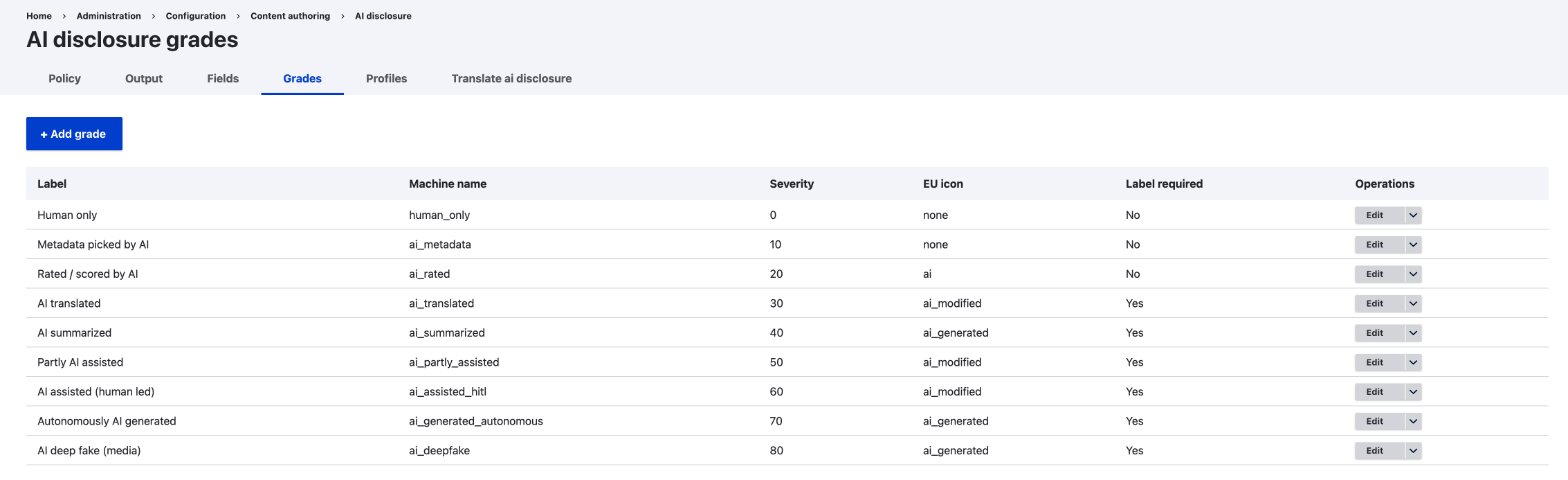
The nine shipped grades
| Machine name | Label | Pick it when | Severity | EU icon | Label required |
|---|---|---|---|---|---|
human_only |
Human only | No AI was involved | 0 | none | No |
ai_metadata |
Metadata picked by AI | AI only chose tags, categories or similar | 10 | none | No |
ai_rated |
Rated / scored by AI | AI only scored or ranked something | 20 | ai | No |
ai_translated |
AI translated | AI translated the text | 30 | ai_modified | Yes |
ai_summarized |
AI summarized | AI produced a summary | 40 | ai_generated | Yes |
ai_partly_assisted |
Partly AI assisted | AI wrote or changed part of it | 50 | ai_modified | Yes |
ai_assisted_hitl |
AI assisted (human led) | A person led, AI helped throughout | 60 | ai_modified | Yes |
ai_generated_autonomous |
Autonomously AI generated | AI produced it, no person writing | 70 | ai_generated | Yes |
ai_deepfake |
AI deep fake (media) | AI made image, audio or video depicting real people or events | 80 | ai_generated | Yes |
Label required is the factual premise both paragraphs of Article 50(4) share: with this grade, AI generated or manipulated the content that was published. The first three do not meet it and fall outside both paragraphs, so they never need an assessment.
Grades used to carry a second flag, review_exemptible, and ai_deepfake was
the only one set to No. It was standing in for something a grade cannot know:
whether the content is a deep fake or text. That is now an explicit answer on
the content, so the flag is gone.
Severity orders the grades and drives the recorder's never-downgrade rule: an automated caller can only raise the effective grade, never lower it.
Each grade also stores the IPTC digital source type URI that feeds the
machine-readable marking. The field is optional, and
what it accepts is either nothing or an absolute URI such as
http://cv.iptc.org/newscodes/digitalsourcetype/trainedAlgorithmicMedia. The
module refuses anything else wherever it comes from, the form, a save from
code, or a config import, because the value is published as it stands.
The machine names are a stable API
Other modules reference grades by ID, so the shipped machine names are not renamed within a major version. Everything else on a grade is editable by the site: the label, the sentence, the severity, the icon, and the legal flag.
Before editing Label required, read Article 50. The shipped configuration states whether AI generated or manipulated the published content. Editing it changes that statement, not only its wording.
Visible parts
Each grade also carries six checkboxes under What readers see (icon, sentence, label notice, how AI was used, link to the AI policy page, editorial responsibility) that decide which parts of the rendered disclosure show for content at that grade. They only switch a part on or off. They never move where its data comes from: the label notice and the policy page link still come from the site's Policy tab, the description still comes from the profile or the item, and editorial responsibility still comes from whoever set it on the profile or the item.
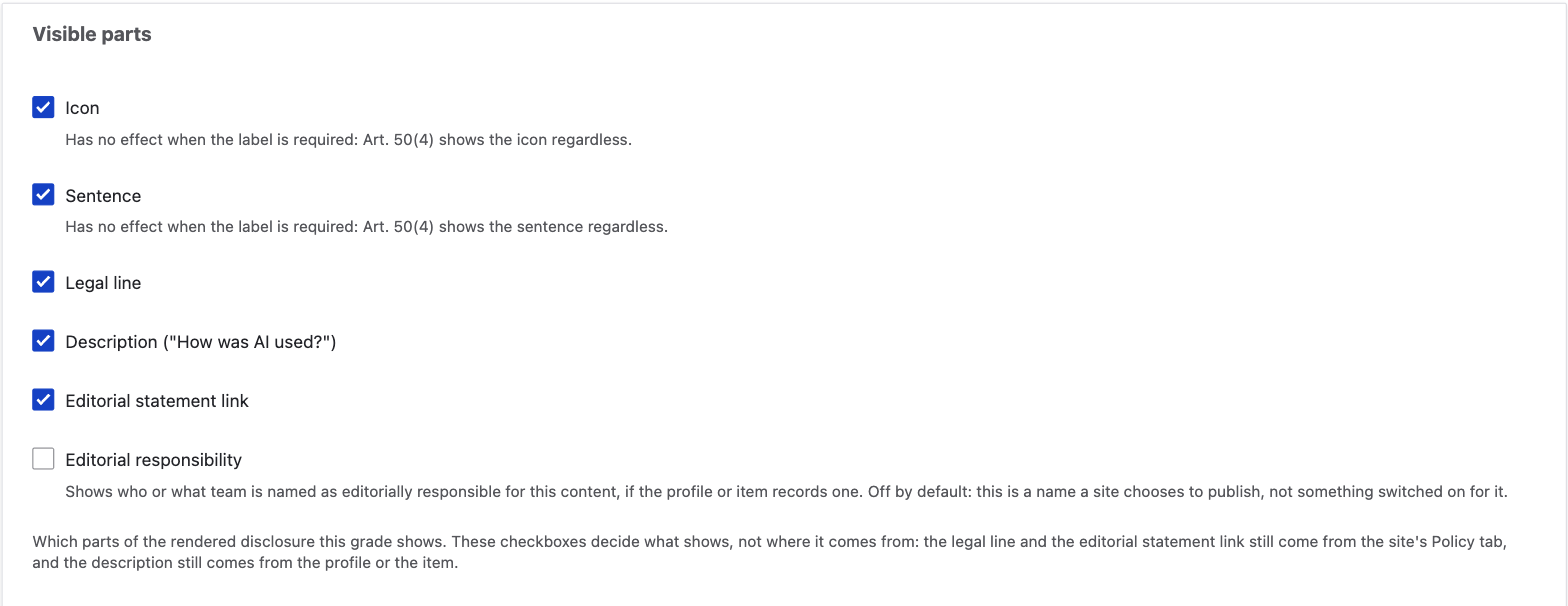
| Grade | Icon | Sentence | Legal | Description | Statement | Editorial responsibility |
|---|---|---|---|---|---|---|
human_only |
No | No | No | No | No | No |
ai_metadata |
No | Yes | No | No | No | No |
ai_rated |
Yes | Yes | No | No | No | No |
ai_translated |
Yes | Yes | Yes | No | Yes | No |
ai_summarized |
Yes | Yes | Yes | Yes | Yes | No |
ai_partly_assisted |
Yes | Yes | Yes | Yes | Yes | No |
ai_assisted_hitl |
Yes | Yes | Yes | Yes | Yes | No |
ai_generated_autonomous |
Yes | Yes | Yes | Yes | Yes | No |
ai_deepfake |
Yes | Yes | Yes | Yes | Yes | No |
When Label required resolves to Required, the icon and the sentence
render whatever the checkboxes say: Article 50(4) does not bend to a display
preference. Nothing else is exempted: unchecking the label notice, how
AI was used, the policy page link or editorial responsibility still hides
them, even on a required label.
Editorial responsibility ships off on every grade, unlike the other five: the value it shows can be a natural person's name, and naming one is the site's own choice to publish, not something switched on for it. Turning it on for a grade shows the name or team a site has recorded, on the profile or the item, as responsible for that content. Leaving it off never hides the rest of the disclosure.
An already-installed site keeps every one of the other five parts on until it
runs the update that sets this table on the nine shipped grades: those
properties' own default is "everything on", so nothing changes for a site
that never runs it, and it never touches a grade the site created itself.
After the update, a site that relied on ai_translated always showing its
description, for example, stops seeing it, and gets it back by checking that
grade's "Description" box again. Editorial responsibility carries no such
transition: its own default is off everywhere, upgrading site and new
install alike.