Calibrate a decision judge
Some judges do not only score an answer, they also say how sure they are that it passes. That number comes from the model, and models are often too sure or not sure enough. In this tutorial you fit a correction from answers people reviewed, read whether it helps, and decide whether to use it. Then you see a correction at work on a field automator.
It takes about 30 minutes and makes no model calls. You need:
- the Validate AI Eval judges permission, for the calibration pages, and Operate AI Eval, to open results;
- a test that uses the decision rubric judge with a decision model, and at least 30 of its answers reviewed pass or fail on the results page, as in Read a result and record your verdict;
- for part 2, the AI Eval Decision Calibration submodule, a field automator that asks a decision model a true-or-false question, and the Administer AI Eval permission for Record decisions.
You will learn to
- tell a judge's score from its pass probability;
- fit a calibration and read whether it made the numbers better or worse;
- decide whether to use a fit, and check an active one on newer answers.
Terms with a dotted underline are defined in the Glossary. Point at one to see a short definition; click or tap it to read the full entry.
How a fit is checked
flowchart LR
    R["Answers people<br/>reviewed"] --> S["Split about in half,<br/>by question"]
    S --> F["Half: learn<br/>the curve"]
    S --> H["Half: held back"]
    F --> C{"Overall error on<br/>the held-back half"}
    H --> C
    C -- "did not rise" --> A["Saved and active"]
    C -- "rose" --> N["Saved, not active"]
Part 1: calibrate the judge
1. Find the pass probability
Open a result of a test that uses the decision rubric judge and expand a
question by clicking the arrow beside its Input. On the demo site, result 30
of the Ask AI test, question open_day_date. The judge's reason reads:
Decision rubric (DR): 100/100 - No rule broken. Score 100 minus 20 per error = 100. Pass probability 0.530, uncalibrated (no active calibration for this provider, model and wording).
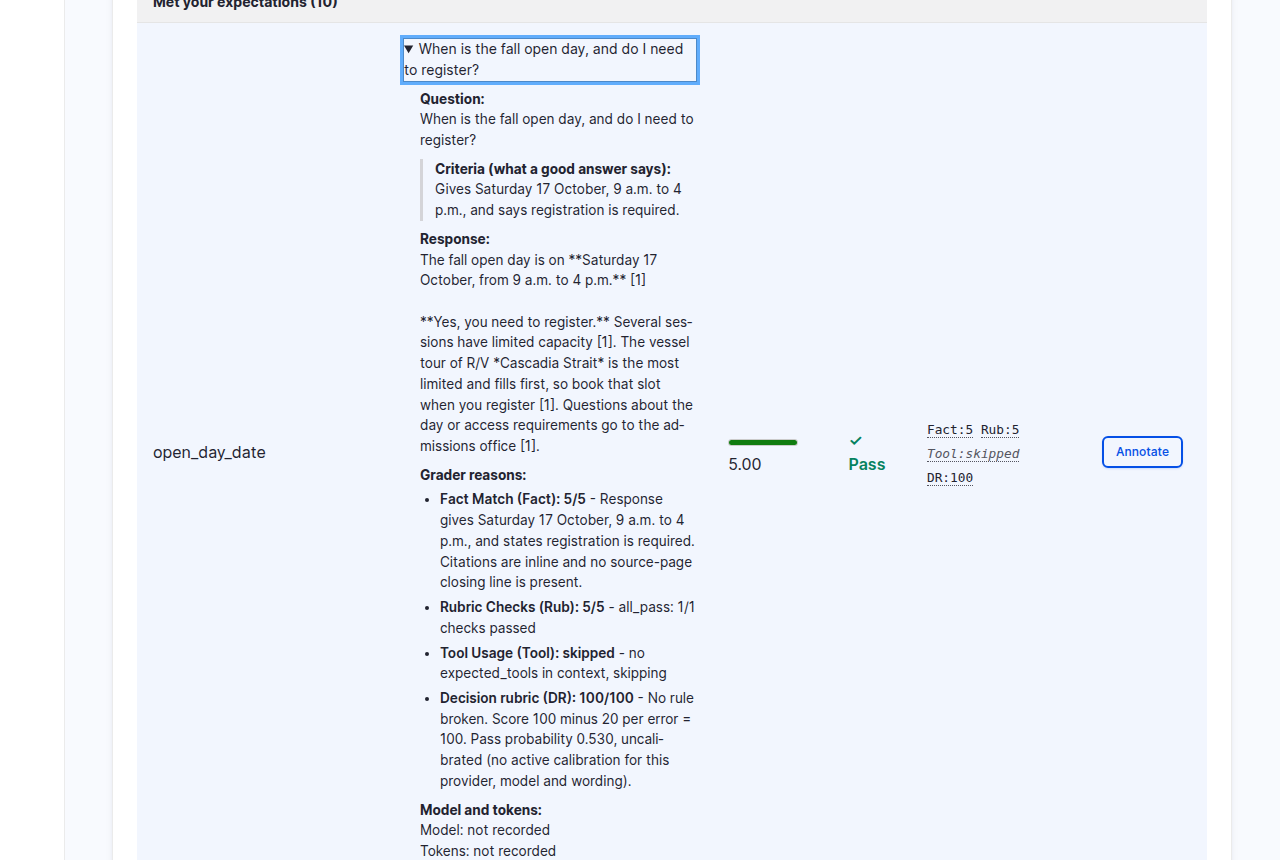
The score and the probability say different things. The score counts the errors the model found, up to two per rule: none, so 100. The probability says how sure the model is that the answer stays within what the pass score allows: barely more than a coin toss. "Uncalibrated" means no correction applies yet.
Under the hood: score and probability
The demo rubric has three rules, 20 points per error and a pass score of 90, so one error already fails. Each rule is asked as one question with three levels: not broken, broken once, broken twice or more. The decision model gives a probability for each level. The score uses each rule's most likely level. The probability combines the levels of all rules, as if the rules were independent, into the chance that the errors stay within the allowance, here zero errors. So the score is the model's best guess, and the probability keeps its doubt.
2. Open the calibrations
Go to AI Eval > Manage > Calibrations. The list shows each calibration, what it Corrects, how many reviewed answers it learned from and how many of them were checked, and its Result.
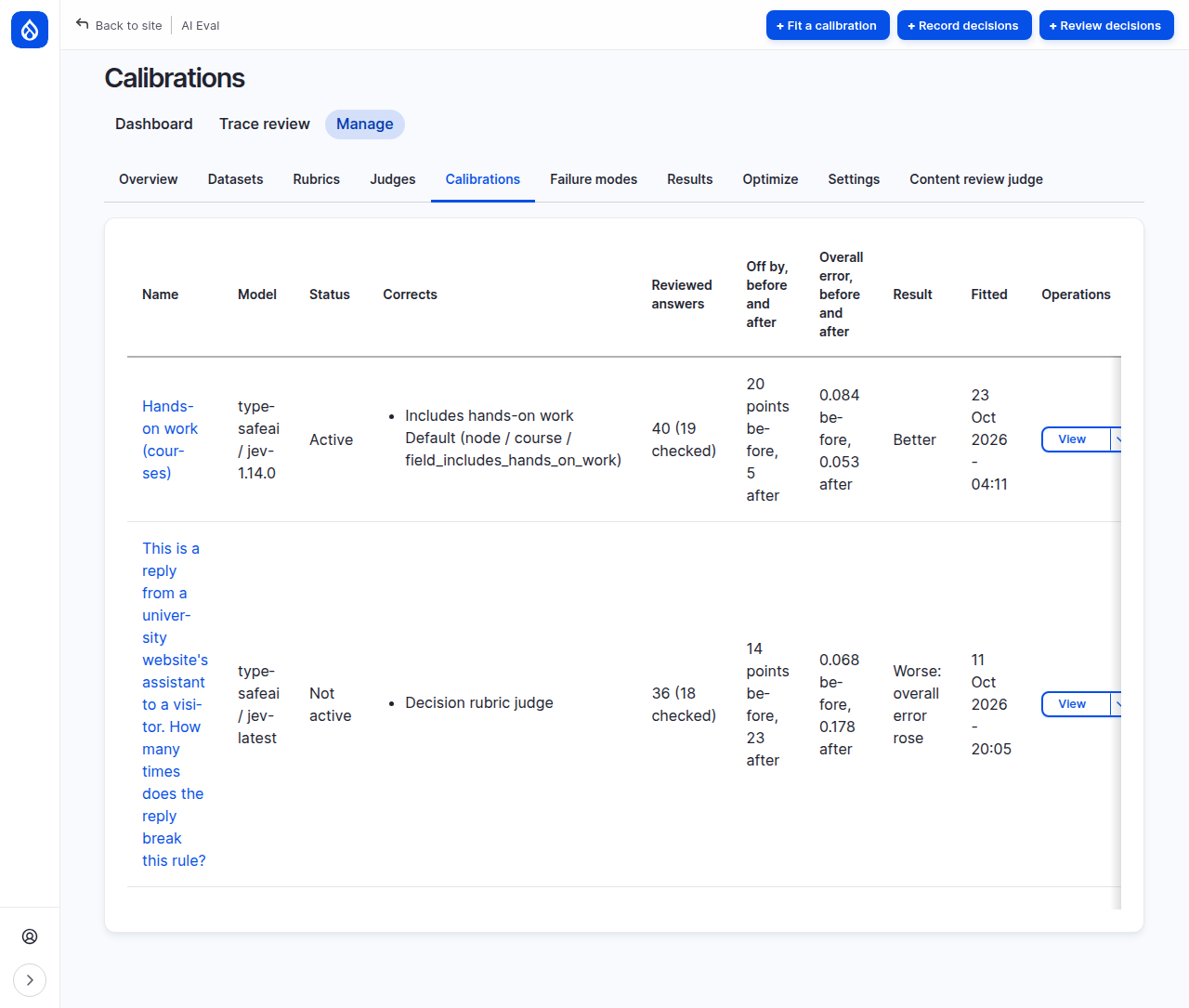
On the demo site there are two: Hands-on work (courses), active, which corrects a field automator (part 2), and an older fit for the decision rubric judge that is not active.
3. Fit from reviewed results
Click Fit a calibration. The Judge tab lists the reviewed answers, grouped by provider, model and question, with how many passed, failed or were deferred, and whether each group Can fit.
- Choose the group whose Rubric column says Current rubric and whose Can fit column says Yes. A group for an earlier wording would not apply to the judge as it is now. Its Can fit cell says so: "Yes, but the judge does not ask this question now, so it will not apply this fit".
- Name: for example
Maria: Ask AI judge. - Click Fit and save.
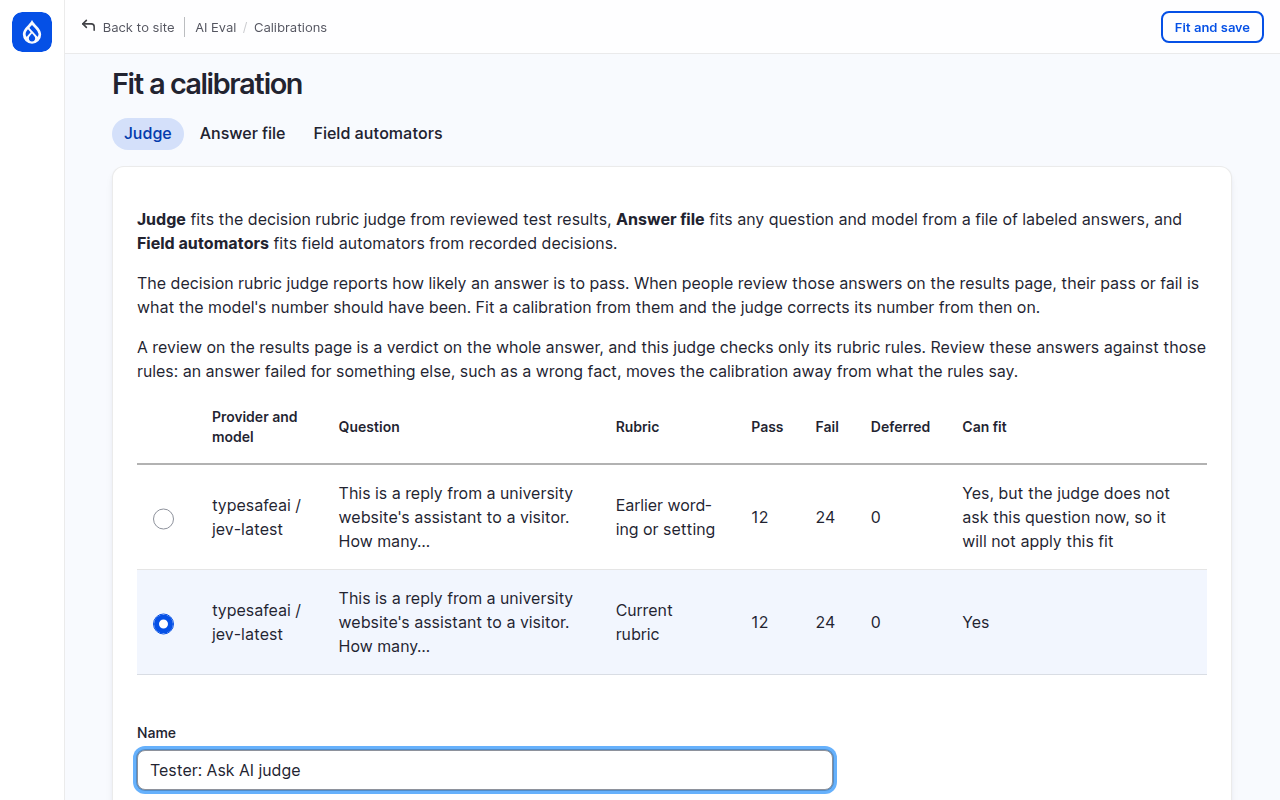
The page warns that a review on the results page is a verdict on the whole answer, while this judge checks only its rubric rules. Review these answers against the rules: an answer you failed for a wrong fact pulls the curve away from what the rules say.
Under the hood: the split
About half the answers teach the curve; the rest, the held-back answers, check it. Answers to the same dataset question stay on the same side, so the check is not flattered by repeats of what the curve learned from. The halves are rarely exact: on the demo site 18 of 36 answers were held back, and 19 of 40 for the field automator. A group needs at least 30 pass or fail answers, both verdicts among the answers it learns from, and answers to enough questions that some can be held back; the Can fit column says which is missing. Deferred answers are counted but not used.
4. Read the fit
On the demo site the fit was saved but not active:
Calibration saved but not active. On 18 answers held back to check it, it made the overall error worse (0.068 before, 0.178 after), so it is not applied. No calibration applies to this model and question until you activate one. It replaced the earlier fit that was not active.
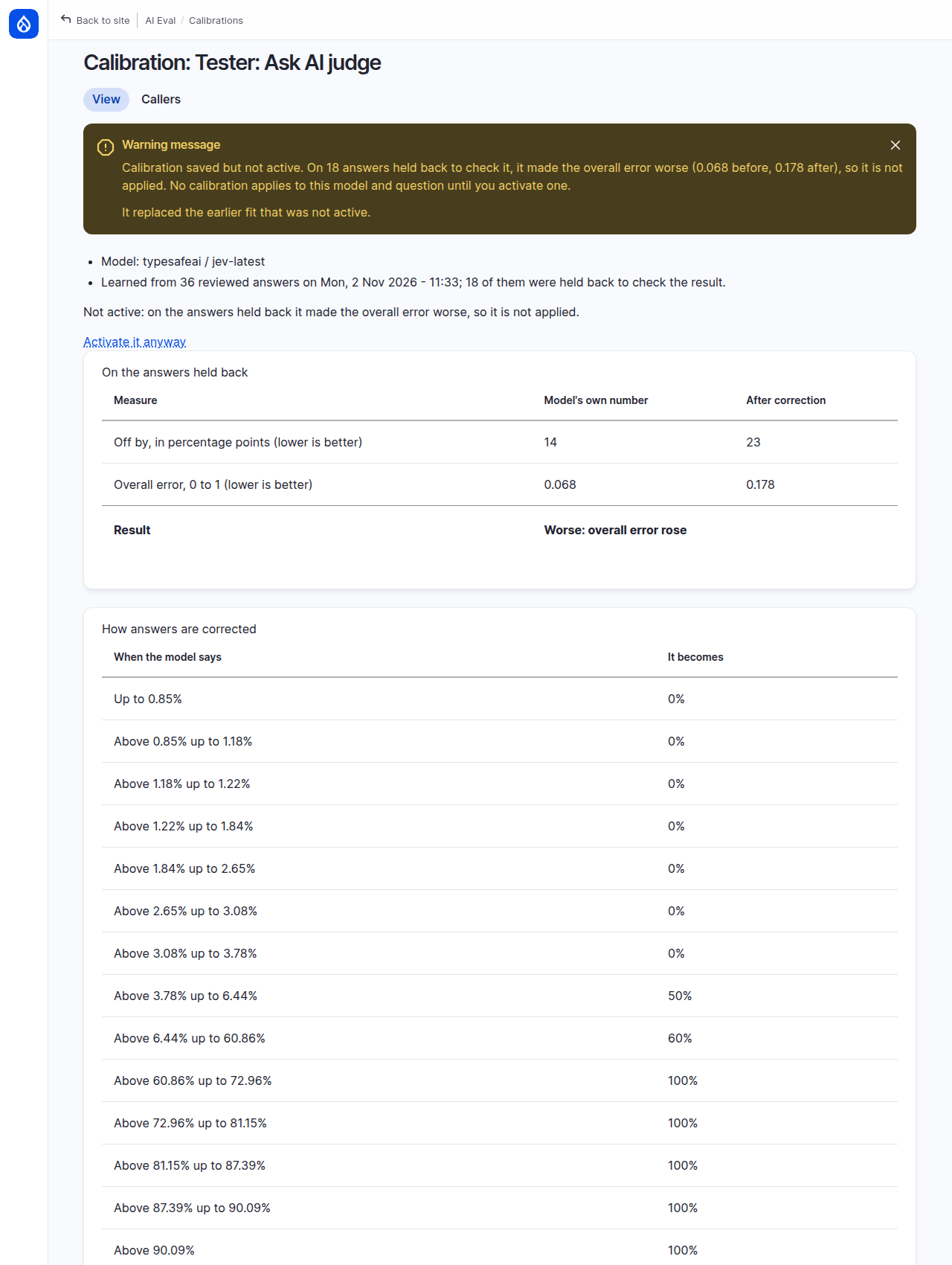
Read the table On the answers held back:
- Off by, in percentage points: how far the probabilities were from how often answers really passed. 14 before, 23 after.
- Overall error: 0.068 before, 0.178 after. Lower is better, so the curve made things worse.
The model's own numbers were already close on these answers, and a curve learned from 18 answers may have fitted their quirks rather than a real pattern. AI Eval saved the fit so you can look at it, but it does not apply it.
Under the hood: better, mixed, worse
The overall error is the Brier score. Better: neither measure rose; the fit is active and replaces an earlier one for the same model and question. Mixed: the overall error did not rise but the off-by figure did; it is still active. Worse: the overall error rose by any amount; it is saved but not active, and an earlier active calibration keeps applying. Only one inactive fit is kept per model and question, so on the demo site the new fit replaced the older inactive one, and the message above ends by saying so.
5. Decide
The page offers Activate it anyway. Do not use it here: on the answers it was checked on, the curve made the judge's numbers worse. Activating it would also delete the other calibrations for this model and question.
What helps instead is more reviewed answers, reviewed against the rubric rules. Fit again when you have them.
Part 2: a calibration at work
A field automator can ask a decision model a true-or-false question about each piece of content, such as "Does this course include hands-on work?". The demo site records those answers, people review them, and an active calibration corrects the probability the field gets. Look at each step; on the demo site every recorded answer is already reviewed.
6. Record the automator's answers
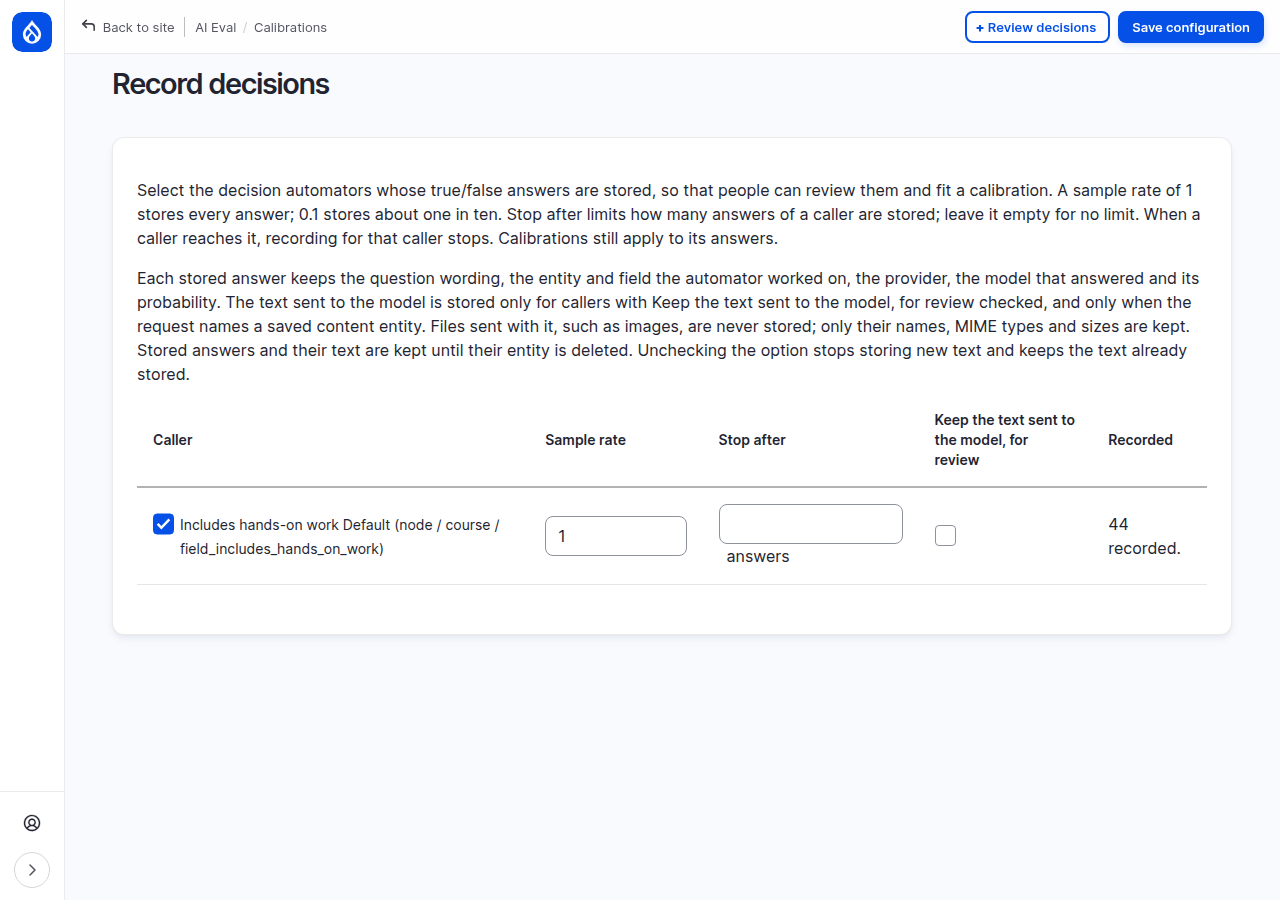
Open Calibrations > Record decisions. Each calibration caller has a checkbox, a Sample rate (1 stores every answer), Stop after (a limit) and Keep the text sent to the model, for review.
7. Review, then compare
Open Review decisions and pick a group. When answers are waiting, read the content through its link, choose True, False or Skip for each answer, then click Save reviews. The page does not show the model's probability, so it cannot sway you. On the demo site nothing is waiting: the group reads "44 recorded, 44 reviewed, 30 needed to fit." and "No answers awaiting review in this group.", so go straight to the Reviewed tab.
The Reviewed tab then shows each label next to the model's probability and, when a calibration corrected it, the corrected one:
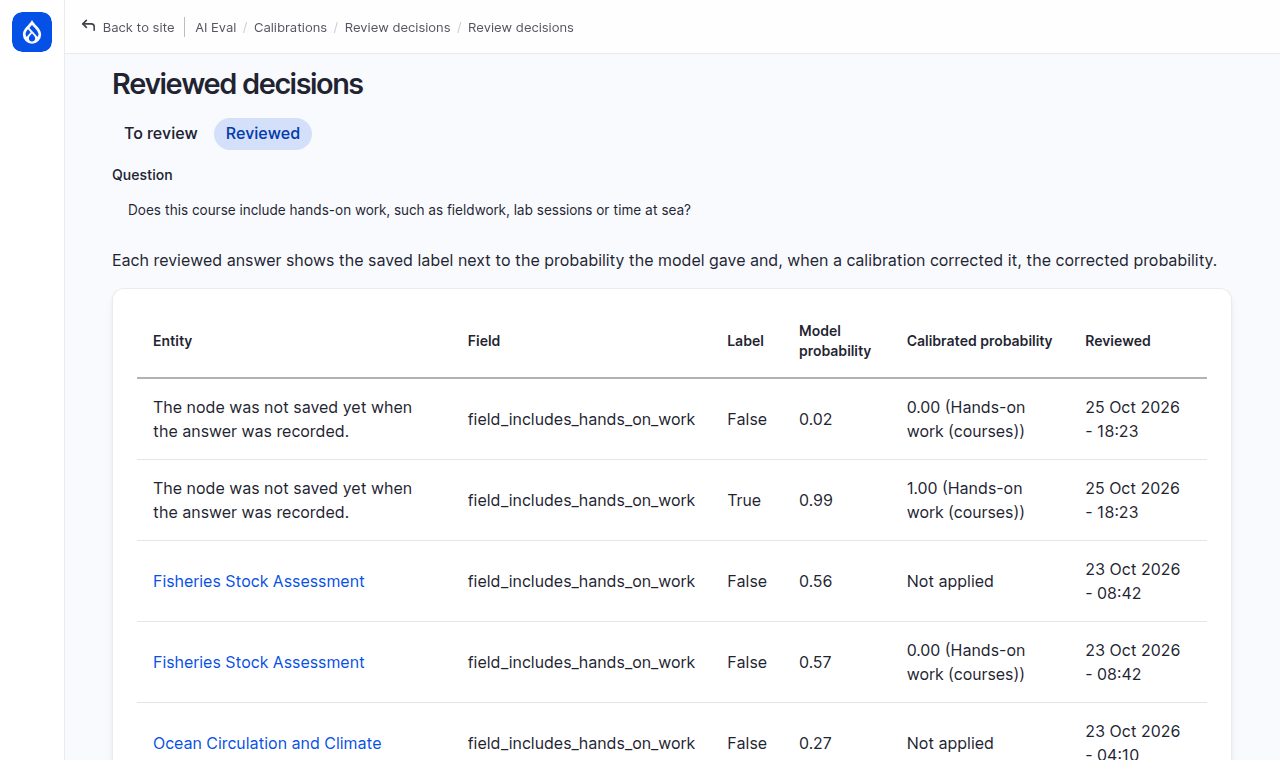
For Fisheries Stock Assessment, reviewed False, the model said 0.57. With the calibration it became 0.00. Not applied means no calibration corrected that answer when it was recorded.
8. Read the active curve
Open Hands-on work (courses) from the list. It learned from 40 reviewed answers and checked 19: the off-by figure fell from 20 to 5 and the overall error from 0.084 to 0.053, so it is Better and active.
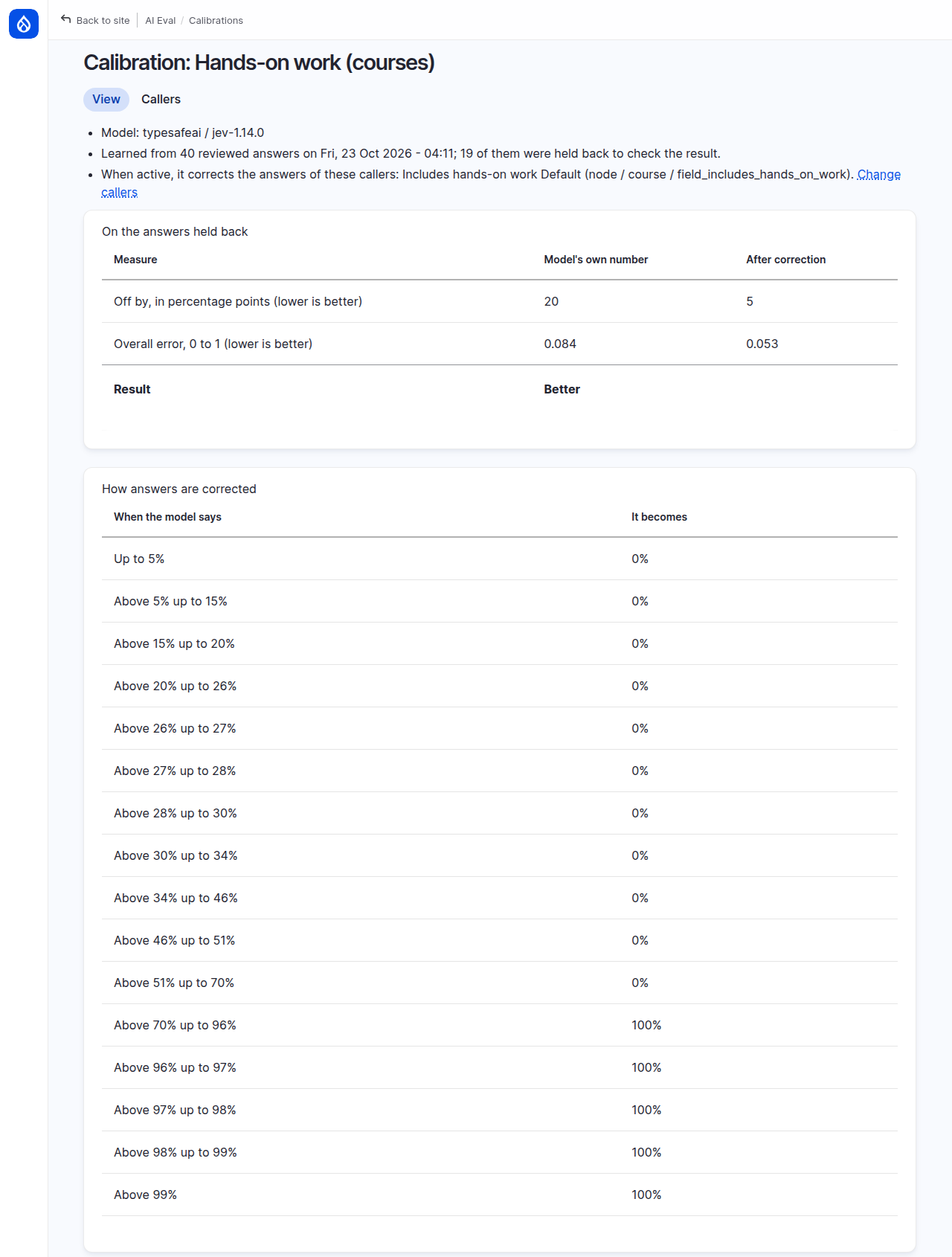
Look at How answers are corrected: up to 70% becomes 0%, above 70% becomes 100%. A curve learned from 21 answers is coarse. It beat the model on the answers it was checked on, but it says nothing in between, so one wrong "100%" costs the most a probability can.
9. Check newer answers
Open the Callers tab. The selected callers use the calibration while it is active. Since this calibration was fitted checks it on answers recorded and reviewed after the fit.
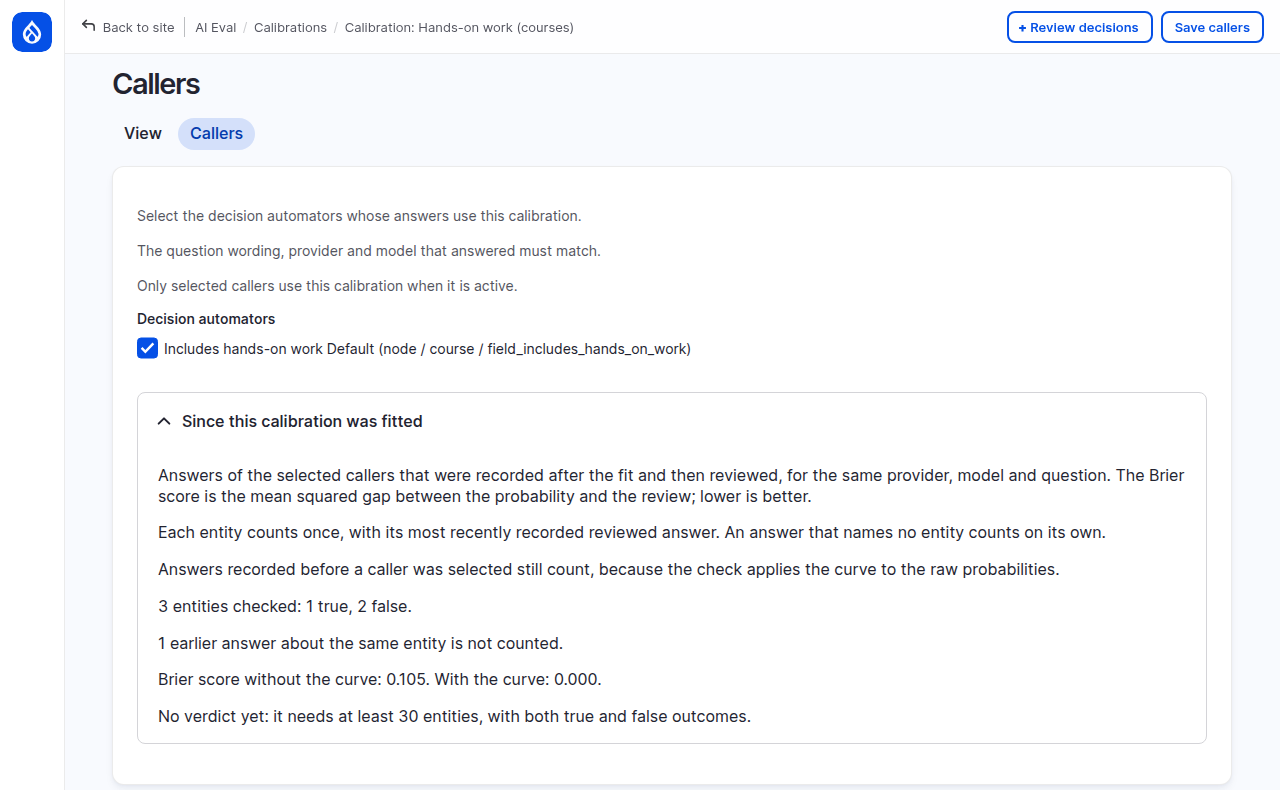
On the demo site: "3 entities checked: 1 true, 2 false. ... No verdict yet: it needs at least 30 entities, with both true and false outcomes." Each entity counts once, with its most recently recorded reviewed answer, so "1 earlier answer about the same entity is not counted." Keep reviewing. When the curve makes newer answers worse, this tab warns you and suggests fitting again; the calibration stays active until you replace or delete it.
Common mistakes
- Activating a worse fit. It was checked and lost. Review more answers and fit again.
- Reviewing for something the judge does not check. A results-page verdict on a wrong fact is not a verdict on the rubric rules, and it bends the curve.
- Editing the rubric after a fit. A calibration applies only to the same wording and the same number of allowed errors it was fitted on. Change a rule and the judge reads "uncalibrated" again until you fit anew.
Check yourself
An answer scores 100 with pass probability 0.53. Is something broken?
No. The score uses the error count the model found most likely; the probability keeps its doubt. A calibration tells you how far to trust that 0.53.
A fit shows overall error 0.068 before and 0.178 after. What happens?
It is saved but not active, because the overall error rose on the held-back answers. An earlier active calibration for the same model and question keeps applying; with none, the judge stays uncalibrated. Someone can still override the check with Activate it anyway.
Why does the review page hide the model's probability?
So it cannot sway your verdict. The curve learns from the gap between your verdicts and the model's numbers; seeing the numbers could pull your verdicts toward them and hide the gap the curve should correct.
Done when
- You can say what the score and the pass probability each tell you.
- You fitted a calibration and can explain its result from the held-back table.
- You decided whether to activate it, and why.
Next steps
- Everything the calibration pages do, including the Answer file tab: Calibrating a decision judge.
- Check the judge itself against your labels: Trusting your judges.