Running evaluations
Three ways to run a target: the admin UI, the ai-eval:run Drush command, and a
scheduled CI job. All three execute the same run engine and write the same
result row. This page is for whoever operates the evals.
From the UI
The Dashboard target list at /admin/config/ai/ai-eval has a per-target Run
button. Open a test to use its workflow page, which also has a Run button and
a run history table with Started, Status, Progress, Errors,
Updated, Score, Gate, Source, and Actions columns. The result
link for a completed attempt is in Actions. History shows the newest 20
attempts and results, including results from Drush and scheduled jobs. Results
without a browser attempt say Started outside this page and have no progress
or cancel controls. A browser attempt and its result appear once.
The run advances one question per HTTP request, so a hundred-question dataset is
a hundred small requests rather than one that times out. Progress and the error
count update on each poll. Execution is browser-driven: closing the page pauses
the run, and opening the Dashboard or the test's workflow page again picks it up
where it left off. A run left paused longer than run_stale_seconds is shown as
Interrupted (see below). A run started here never continues in the
background. For a run nobody watches, such as a nightly check, use
drush ai-eval:run from CI or cron (In CI).
A run started from the admin pages runs its questions and graders as the
account that started it, even when someone else opens its page. The progress
line shows who started it. A question's caller_uid switches only the target
call; graders keep the starter's account. If that account is deleted or
blocked, the run stops with a message asking you to start it again. Older runs
without a recorded starter keep using the account viewing the page.
A Cancel button stops the run cleanly. A
cancelled run is marked cancelled and writes no result row, so its partial
scores remain only on the run attempt and do not become a completed result.
A run does not start when the test's dataset has no questions to run. The dataset may be missing or not valid, or every question may be turned off. The Run button shows the reason and no result is stored. drush ai-eval:run prints the same reason for that target, runs the other targets, and exits with 1. The same applies when --question names an ID that a target does not have, or --split names an empty split: that target is reported as an error and the command exits with 1.
An active run is shown as Interrupted when it has made no progress for the
configured run_stale_seconds interval, 300 seconds by default. Resume
continues that same attempt from its saved progress. Cancel abandons it.
After a cancelled, errored, or interrupted attempt, Start a new run runs
every example again. It can repeat provider calls and incur provider charges.
If a progress request throws, the attempt enters the error state and polling
stops. Retry starts a separate run. The last_error field records the message, with the exception class in front
for unexpected failures, truncated to 1,024 characters. A message the module
words itself, such as the one for a dataset that changed during the run, is
stored without the class. This supplies the error detail shown in the UI.
An admin run keeps the question IDs and order it had at its start, so reordering the dataset or adding questions does not change which questions it runs. If a selected question is missing when its step starts, the run stops with an error that names that question. Older runs, or datasets without unique, non-empty question IDs, keep running by position and stop if the dataset loses questions, with an error that names the question counts at the start and now. Retry starts a new run on the dataset as it is.
Two locks limit concurrent work: a per-target lock at run start, and a per-run lock on each step. A slow question can outlast its step lock and be called again. Only the first step to save that question's progress keeps its score. A question that finishes after cancellation cannot change the saved scores. Finalization claims the active run before scoring and writes one result, even when two requests try to finish it together.
stateDiagram-v2
    [*] --> pending: Run pressed
    pending --> running: first step
    running --> running: one question per poll
    running --> complete: last question graded
    running --> cancelled: Cancel pressed
    running --> error: run failed
    complete --> [*]: result row written
    cancelled --> [*]: no result row
Running from the UI needs the operate ai eval or administer ai eval
permission.
A result page leads with how many examples met your expectations, then the run summary and the per-example table with the failed examples first:
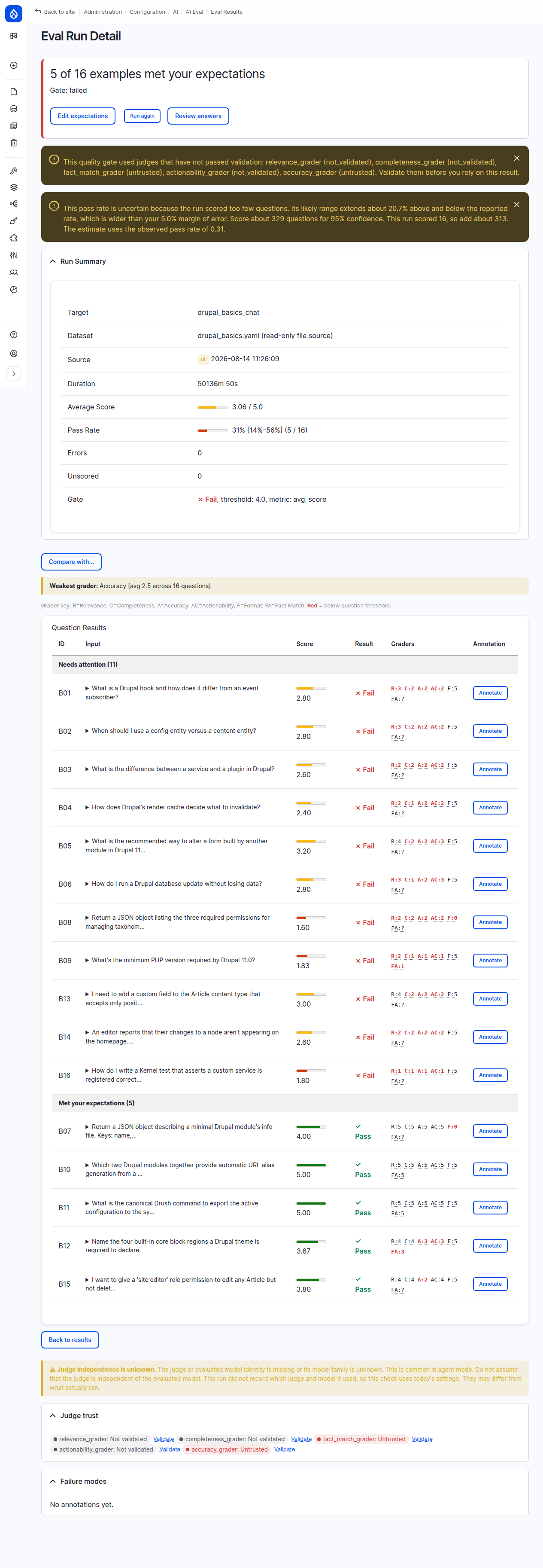
The run summary also shows the target model, the judge models, the tokens used and how many responses were shortened before the judges read them. Each expanded example lists its model, its tokens and whether its response was shortened. A count the run did not record reads "not recorded", never 0.
From Drush
The command is ai-eval:run, alias aer. With no options it runs every enabled
target.
# Every enabled target
drush ai-eval:run

# One target, or one question of one target
drush ai-eval:run --target=my_target
drush ai-eval:run --target=my_target --question=Q01

# List what would run, calling no provider
drush ai-eval:run --dry-run

# Also write a timestamped JSON results file
drush ai-eval:run --json

# Tag the run so cron runs are distinguishable from manual ones
drush ai-eval:run --source=cron

# Run every question as Drupal user 2
drush ai-eval:run --as-user=2
Options
| Option | Default | What it does |
|---|---|---|
--target |
all enabled targets | Run only this target id. An unknown id is an error that lists the available ids. |
--question |
all questions | Run only this question id. Skips the sample-size advisory, since the run is a single question. |
--split |
all |
Run only the train, validation, or test partition of the dataset. Any other value is an error. See datasets. |
--source |
manual |
The run source tag stored on the result row. |
--as-user |
none | The Drupal uid used as caller for every question. |
--dry-run |
off | List targets and question counts, then exit. Ignores --split, see below. |
--json |
off | Also write a JSON results file. |
Dry run
--dry-run resolves each target's dataset and prints the target id, the question
count, and the dataset reference. It calls no AI provider, grades nothing, and
writes no result row, so it costs nothing and is the cheap way to confirm that a
target points at the dataset you think it does.
$ drush ai-eval:run --dry-run
DRY RUN: would evaluate these targets:
  my_target: 24 questions from my_dataset.yml
Warning
--dry-run ignores --split. The dry-run branch loads and counts the
dataset before the split reaches the runner configuration, so
--dry-run --split=test reports the whole dataset, not the test partition.
The count it prints is the full question count in that case.
The JSON results file
--json writes one file per invocation, covering every target the run touched.
It goes to the results_path set in configuration, or to
the system temp directory plus /ai_eval_results when that setting is empty. The
filename is results-YYYYmmdd-HHMMSS.json and the payload is the run timestamp
plus one entry per target id. The path is printed at the end of the run.
This file is a raw dump of the run, not a portable artifact. For an artifact meant to travel between sites, see sharing results.
Tagging the run source
--source sets the source column on the result row, and nothing else. It
defaults to manual, the UI writes ui, and a scheduled job should pass
--source=cron. The tag is carried into exported envelopes as run_source, so
"did this number come from a nightly job or from someone pressing Run" stays
answerable after the fact.
Running as a specific user
--as-user=N sets the run's default caller uid. A question that carries its own
caller_uid keeps it, so the option is a default rather than an override.
The caller is the Drupal account the test runs as: AI Eval switches to that
user for the agent or chat call, and back afterwards, so access checks and AI
Metering see that user. Judges are not switched. 0 means anonymous on purpose;
a uid with no account fails the question with "caller uid N has no account".
Warning
Without --as-user or a caller_uid, the test runs as whoever started the
run, and from drush that is anonymous. On a site with AI Metering, anonymous
traffic shares one monthly token budget, so agent tests run from drush
spend the budget your visitors use, and can use it up. Run agent tests as a
dedicated eval user.
A host module can also register an ai_eval.caller_context service
implementing Drupal\ai_eval\Service\CallerContextInterface, for user-scoped
state beyond the Drupal account (per-user memory, for example). AI Eval hands it
the caller uid as well; it ships no implementation of its own.
The result line
A must-pass failure prints a warning naming each question and grader, for
example q2 (fact_match_grader). It fails the gate whatever the average or
pass rate. Hard gates exit 1; soft gates still exit 0. JSON output includes
must_pass_failures with question ids and grader lists.
Each target prints one line with its average score, its pass rate with the likely range, the gate verdict and how long it took:
my_target: 4.80/5.0 (pass_rate: 100% [70.1%–100%], 9 of 12 measured: 3 errors) [PASS] 34s
The pass rate counts only the questions that were measured. A question that errored (the agent or a judge failed, for example on a provider rate limit) or that no grader could score is left out, so when that happens the line says how many of the questions the rate is over, and why the others are missing. When every question was measured, that part is not shown. The result page shows the same count next to the pass rate.
Advisories printed during a run
A run prints warnings that never change the verdict or the exit code:
- The dataset is below the sample-size floor. See scoring.
- The gate verdict rests on a judge that is not trusted: it failed validation, its validation is out of date, or it was never validated. See judges.
- The judge shares a model family with the evaluated model, so the scores are not an independent measurement.
- The target runs in agent mode and no attached grader observed what the agent did, so every score is a reading of the response text. See graders.
Exit codes
| Code | Meaning |
|---|---|
0 |
Every hard gate passed, or the run was a dry run. |
1 |
A hard gate failed, or the command could not run: unknown target, no targets configured, an invalid --split, or a failed JSON write. |
A soft gate that misses its threshold logs a warning and does not change the exit code by itself. Which targets are hard and which are soft is a per-target setting, covered in scoring.
With the refuse_unvalidated_judges setting on, a pass that rests on a judge
that has not passed validation is stored as a failed gate, so on a hard gate
the exit code is 1. The last line of the output names every gate that did
not pass and says whether it failed or its pass was not counted; it reads
All hard gates passed. only when every gate passed. Changing the setting
applies to runs that finish after the change, a run already in progress
included: earlier results keep the verdict they were stored with.
In CI
Because a failed hard gate exits 1, a scheduled pipeline job can gate on eval
health. AI Eval ships no cron integration on purpose: a full run can be hundreds
of LLM calls, and when to spend that belongs to site operations. A Drush run
executes every question in one process, so it needs no open page.
# .gitlab-ci.yml, run from a scheduled pipeline
ai_eval_nightly:
  stage: test
  rules:
    - if: $CI_PIPELINE_SOURCE == "schedule"
  script:
    - drush ai-eval:run --source=cron --target=my_target --json
  artifacts:
    when: always
    paths:
      - sites/default/files/ai-eval-results/
    expire_in: 30 days
Point the paths entry at whatever results_path you configured, and create the
schedule under CI/CD, Schedules in the project settings. A crontab line does the
same job on a host with no pipeline:
0 2 * * * cd /var/www/html && drush ai-eval:run --source=cron --as-user=2
Replace 2 with the uid of a dedicated eval user. Without --as-user or a
question's caller_uid, a Drush run calls the AI feature as anonymous (see
Running as a specific user).
Two things are worth adding to a pipeline that gates on eval results. Run
drush ai-eval:judges --json in the same job to record which judges were trusted
at the time, since an eval result is only as good as the judges behind it; see
judges. And export an envelope if you want the run's evidence to
outlive the pipeline log; see sharing results.