Permissions
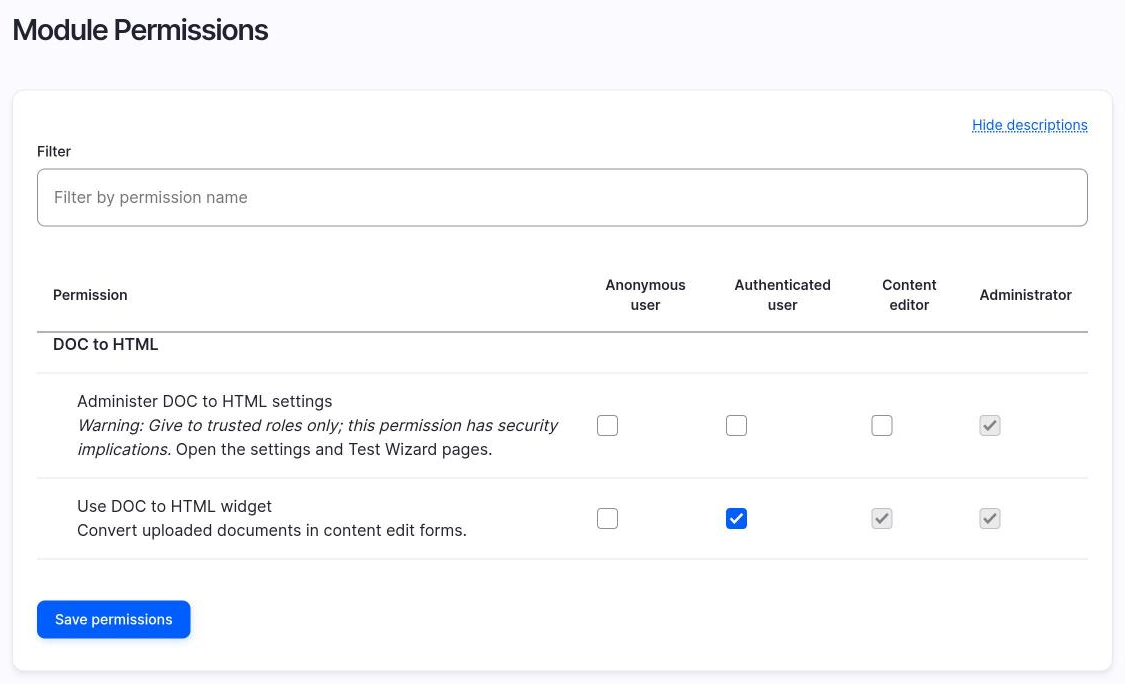
| Permission | Purpose |
|---|---|
administer doc to html settings |
Opens the three admin pages. Marked as restricted. |
use doc to html widget |
Shows the conversion section in node forms and allows Convert. |
Use the widget
The widget section is shown only to users with use doc to html widget. Others see a plain text area. The permission is checked again when Convert is submitted.
Sites updated to 2.1.0 get this permission on the Authenticated role, so editors who use the widget today keep it. To restrict it, remove it from Authenticated and give it to the roles you want, on /admin/people/permissions.
Since 2.1.0
In 2.0.x the permission was declared but not checked, so every editor saw the widget. See Versions.
Administer settings
administer doc to html settings is a restricted permission. Give it only to trusted roles.
A note on the update 8002
In version 2.0.0 the update doc_to_html_update_8002 gave administer doc to html settings to every role that had access administration pages. That is a wider group than you may want, because the permission is restricted.
The module does not remove anything on its own. Instead, the status report has an entry that lists the roles that are not administrator roles and have this permission. Check the list and remove the permission from the roles that do not need it.
