Theming
Since 2.1.0
The formatter, the template and the library do not exist in 2.0.x. See Versions.
The text that a conversion puts in a field is plain HTML. To control how it looks on the page, show the field with the formatter DOC to HTML converted content. It wraps the text in a template that you can override, and it attaches a small library that you can remove or replace.
The formatter
The formatter works on text_long and text_with_summary fields. It renders the processed value like the default text formatter, so the text format filters still run. The difference is the wrapper.
- Go to Structure > Content types > [type] > Manage display.
- For the text field, choose the formatter DOC to HTML converted content.
- Open its settings with the gear icon if you want to change them, then click Update and Save.
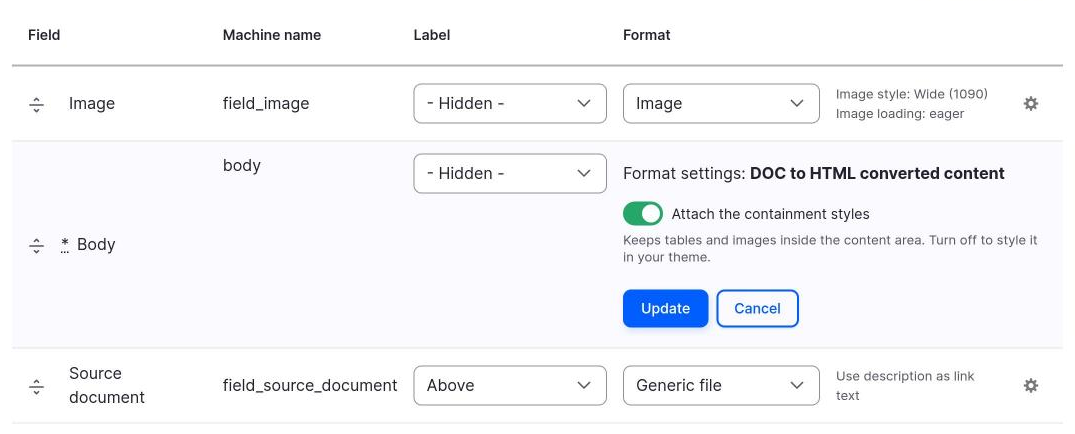
| Setting | Meaning |
|---|---|
| Attach the containment styles | Attaches the library doc_to_html/content. Default on. |
The wrapper and the classes
The default template, templates/doc-to-html-content.html.twig, prints:
{%- set classes = [
  'doc-to-html-content',
  'doc-to-html-content--' ~ bundle|clean_class,
] -%}
<div{{ attributes.addClass(classes) }}>{{ content }}</div>
The wrapper has two classes:
doc-to-html-content, on every field that uses the formatter.doc-to-html-content--<bundle>, for exampledoc-to-html-content--article.
Style the converted text with them, for example .doc-to-html-content table { ... } in your theme.
Variables
| Variable | Content |
|---|---|
content |
The processed text, as the default text formatter renders it. |
entity_type |
The entity type id, for example node. |
bundle |
The bundle, for example article. |
field_name |
The machine name of the field, for example body. |
view_mode |
The view mode, for example full. |
attributes |
The attributes of the wrapper. |
Template suggestions
The theme hook is doc_to_html_content. It has four suggestions, from the most general to the most specific:
| Suggestion | Template file |
|---|---|
doc_to_html_content__node |
doc-to-html-content--node.html.twig |
doc_to_html_content__node__article |
doc-to-html-content--node--article.html.twig |
doc_to_html_content__node__article__body |
doc-to-html-content--node--article--body.html.twig |
doc_to_html_content__node__article__body__full |
doc-to-html-content--node--article--body--full.html.twig |
The pattern is doc_to_html_content__{entity_type}__{bundle}__{field}__{view_mode}. The examples use the entity type node, the bundle article, the field body and the view mode full. In a file name, Drupal turns each underscore of the names into a hyphen, so the field field_source gives field-source.
Copy doc-to-html-content.html.twig into the templates folder of your theme, rename the copy to the suggestion you need, and clear the cache.
{# doc-to-html-content--node--article--body.html.twig #}
<article class="report-text">
  {{ content }}
</article>
The library
The library doc_to_html/content has one file, css/doc-to-html-content.css. It only keeps the converted content inside its wrapper:
- Tables are
display: blockwithoverflow-x: autoandmax-width: 100%, so a wide table scrolls and does not break the layout. - Images have
max-width: 100%andheight: auto. - Elements with a
column-countstyle get acolumn-gapof2rem.
The file sets no colors and no fonts, so your theme decides how the text looks.
Turn it off for one display
Clear Attach the containment styles in the settings of the formatter.
Remove it from the site
In the .info.yml file of your theme:
libraries-override:
  doc_to_html/content: false
Replace it
Point the file of the library to a file of your theme:
libraries-override:
  doc_to_html/content:
    css:
      component:
        css/doc-to-html-content.css: css/my-content.css
The path on the left is relative to the module, the path on the right to your theme. To add rules and keep the library, use libraries-extend instead.