Setting it up
Three separate pieces of configuration decide what an editor sees. Missing any one of them is the usual reason links do not appear.
flowchart TB
    A["1. Bundle listed in<br/>Entity types and bundles"] --> D[Edit link appears]
    B["2. extra_field_frontend_editing<br/>on the view display"] --> D
    C["3. Formatter third-party settings<br/>on the reference field"] --> E[Add, move, delete,<br/>duplicate links appear]
    D --> E
Step 1: choose entity types and bundles
Go to Configuration → Frontend Editing → Entity types and bundles
(/admin/config/frontend-editing/entity-bundle-restrictions). Pick an entity type on the left, tick
its bundles on the right, and save. Entity types with at least one bundle enabled are marked
Enabled.
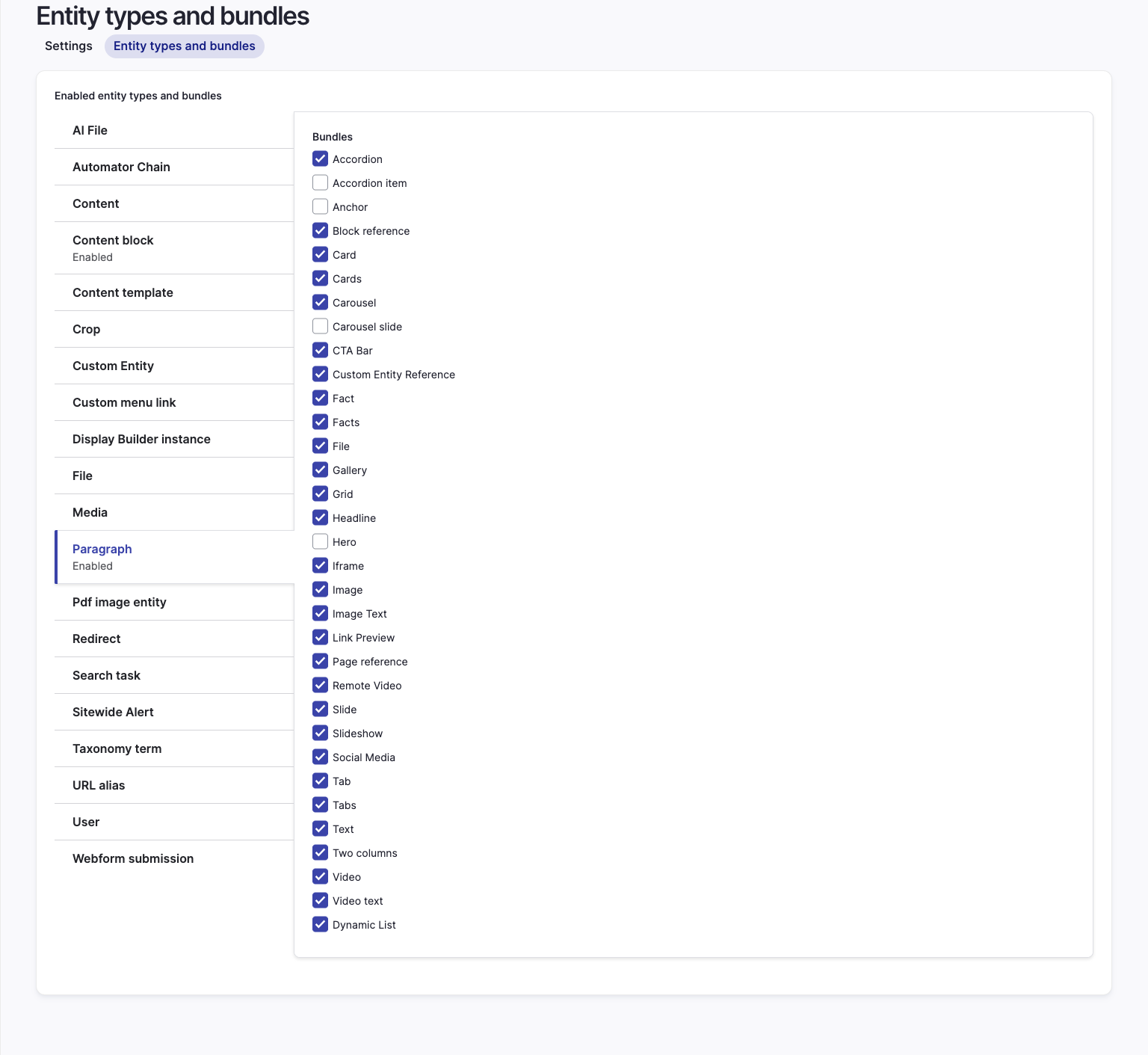
This setting does two jobs, and it is worth knowing they are separate:
- It decides which bundles get the
extra_field_frontend_editingextra field offered on their view display. - It gates the referenced entity type and bundle of a reference field. A field's Frontend
Editing formatter settings are ignored unless the field's target type and bundle are listed
here, whatever entity type the field itself lives on. A paragraphs field on a node needs
paragraphbundles listed, notnode.
Note
After changing this setting from code, clear the extra field plugin cache:
\Drupal::service('plugin.manager.extra_field_display')->clearCachedDefinitions();.
The admin form does it for you.
Step 2: place the extra field
For each enabled bundle, open its Manage display and move the Frontend editing extra field out of Disabled into the content region.
Without it, no action links render on that entity, even when the bundle is listed in step 1. The extra field is also what attaches the module's JavaScript library, which the delete confirmation dialog and the sidebar both depend on.
Step 3: enable the per-field operations
Add, move, delete and duplicate act on the items of an entity reference field, so they are configured on the field formatter of the parent entity, not on the referenced entity.
On the parent's Manage display, open the field's formatter settings and turn on what that field should allow:
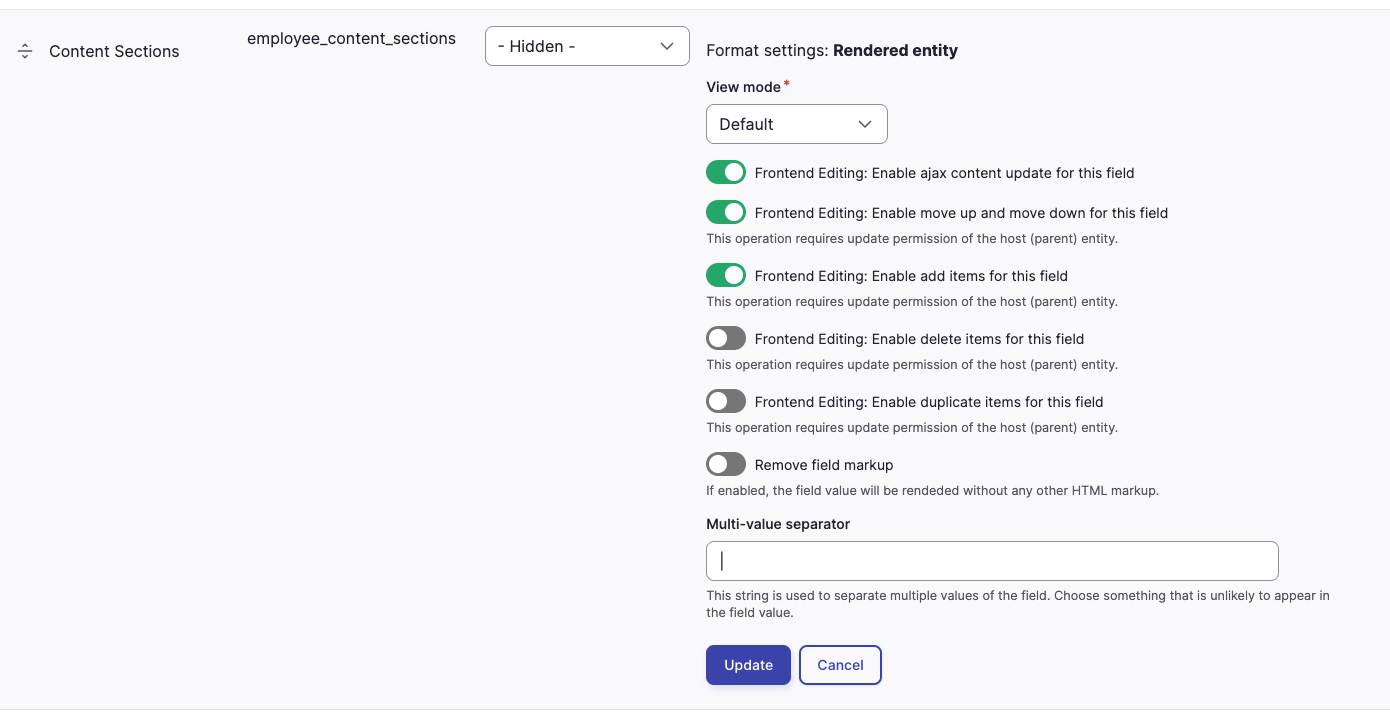
| Setting | Effect |
|---|---|
| Enable ajax content update for this field | After an operation, the field re-renders in place instead of reloading the page |
| Enable move up and move down for this field | Adds the up and down arrows |
| Enable add items for this field | Adds the round add buttons before and after each item |
| Enable delete items for this field | Adds the delete link |
| Enable duplicate items for this field | Adds the duplicate link |
Every operation except the plain edit link also requires update access on the host entity, on top of the matching permission.
Step 4: grant permissions
At minimum, give the editor role access frontend editing. Each operation has its own permission.
See Permissions.
Step 5: tune the interface
The main settings form at /admin/config/frontend-editing covers sidebar width, the toggle, hover
highlighting, preview, contextual links and the rest. Every field is listed in the
settings reference.
When links do not appear
Work down this list:
- Is the bundle listed under Entity types and bundles? For a reference field, is the referenced bundle listed?
- Is the
extra_field_frontend_editingextra field enabled on that bundle's view display? - Does the user have
access frontend editing, plus the permission for the specific operation? - Is frontend editing switched on for that user? The toggle state is per user.
- For add, move, delete or duplicate: are the formatter third-party settings enabled on the parent field, and does the user have update access to the host entity?
- Is the entity the latest revision? Actions are not attached to older revisions. For a paragraph, that is the revision of the host it is rendered from. With content moderation, the live page has no actions while a draft exists.
- For moderated content, may the user make the transition into the draft state? If not, the actions are hidden. See Content moderation.
- Is the display managed by Display Builder or Layout Builder? Enable the matching sub-module.