Usage overview
Once a Review Rule covers an entity's type and bundle, review state shows up on four surfaces.
| Surface | Where | What it is for |
|---|---|---|
| Review tab | /<entity path>/ai-review |
Run criteria, read results, apply and triage suggestions. |
| Edit form sidebar | The entity edit form | Read-only summary of the latest results, plus the improvement plan checklist. See Suggestions. |
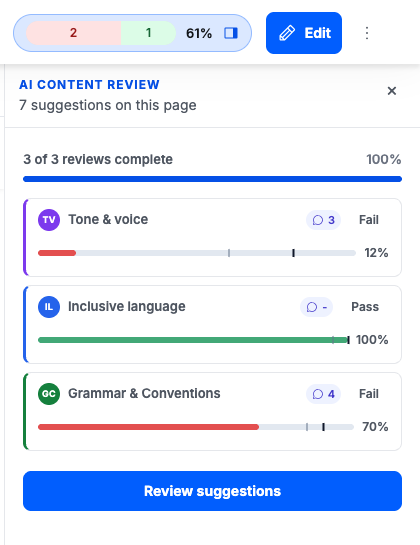
| Top bar panel | Rendered entity page, with the core Navigation module | Summary pill that opens a side panel holding the run list and the triage cards. |
| Content listing | /admin/content and /admin/content/ai-review |
The AI review pill column, sorting and filtering across all content. |
With the core Navigation module enabled, a summary pill in the top bar of any reviewed page opens a panel holding the run list and the suggestions to triage.
Reviews can also be started without a person watching. See Bulk and scheduled reviews.
Everything any of these surfaces shows comes from Review Records, which are append-only.
Review paths
For an entity at /node/1:
| Path | Page |
|---|---|
/node/1/ai-review |
The review tab for that entity. |
/node/1/ai-review/history |
Every record ever produced for that entity. |
The route is derived from each entity type's canonical path, so node is only an example. Any
content entity type targeted by a rule gets the same two paths and the same AI Review local
task.
Who can do what
See Permissions. In short: Run AI content reviews to trigger and triage, View AI review records to read results, Configure AI content review rules to define them, and Queue AI reviews in bulk to spend provider budget in batches.