Configuration
Nothing happens until a Review Rule exists. A rule answers three questions: what is reviewed, which content it covers, and which criteria run against it.
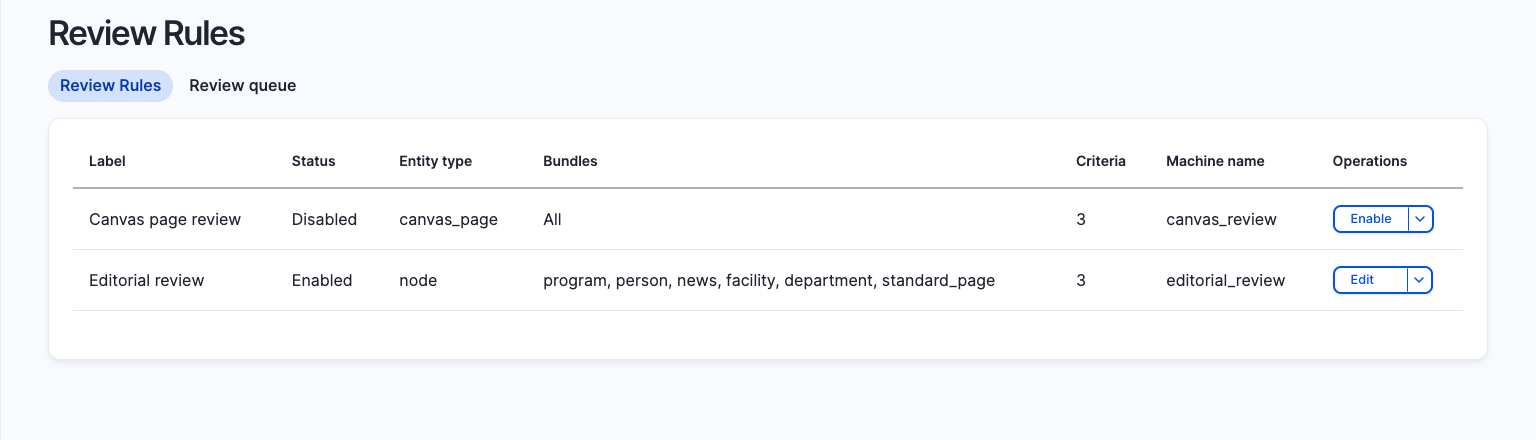
Admin pages live under Administration → Configuration → AI → AI Content Review:
| Page | Path |
|---|---|
| Review Rules | /admin/config/ai/content-review/rules |
| Review Records | /admin/config/ai/content-review/records |
| Review queue | /admin/config/ai/content-review/queue |
Step 1: configure an AI Agent
Each criterion delegates scoring to an AI Agent. One agent is usually shared by every criterion. The agent's instructions say how to review (read the task, score the content, report through the result tool) and bring in the content. Each criterion's Guidelines & rules say what to judge.
Example agent instructions:
You are an editorial content reviewer. You judge ONE criterion at a time: the task message gives you its guidelines, the aspects to weigh and scored calibration examples. Score only that criterion, from 0 to 100, and call the "AI Content Review Result" tool exactly once with the status, score, severity, an explanation that quotes the content, and any concrete suggestions.
Content to review: [node:title] [node:body]
Every agent used by a criterion must include the AI Content Review Result tool. Agents without it are not offered in the criterion's agent select. Add the AI Content Review Suggestion Item tool as well if the agent should return suggestions. Both tools sit in the AI Content Review group of the tools library. See Agent tools for the contract they enforce, and the AI Agents documentation for how to attach tools to an agent.
A criterion can point at its own agent when it needs different tools, different instructions or a different model.
Step 2: create a Review Rule
Go to Review Rules and click Add review rule.
| Field | Meaning |
|---|---|
| Name | Human-readable label, for example Editorial quality, article. |
| Reviews | The review record type this rule targets. Internal covers Drupal content entities. External covers a remote source identified by a URL. |
| Entity type | For internal rules, the entity type to target, for example Content (node). |
| Entity subtypes | Bundles within that entity type. Leave everything unchecked to cover all bundles. |
| Scheduled re-review | Whether cron queues this rule's content for re-review, and how often. Off by default. See Bulk and scheduled reviews. |
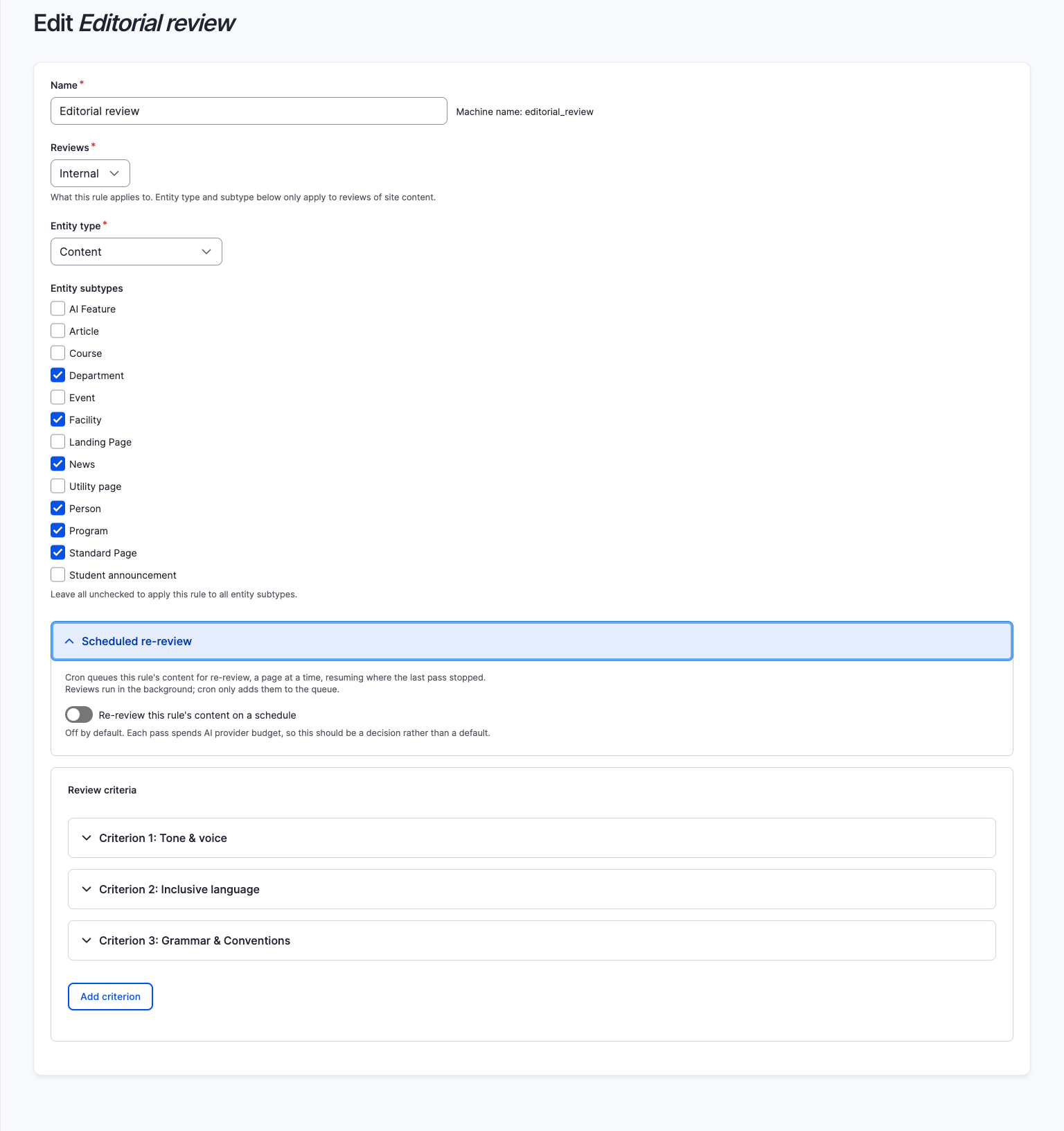
Then add one criterion per quality dimension with Add criterion.
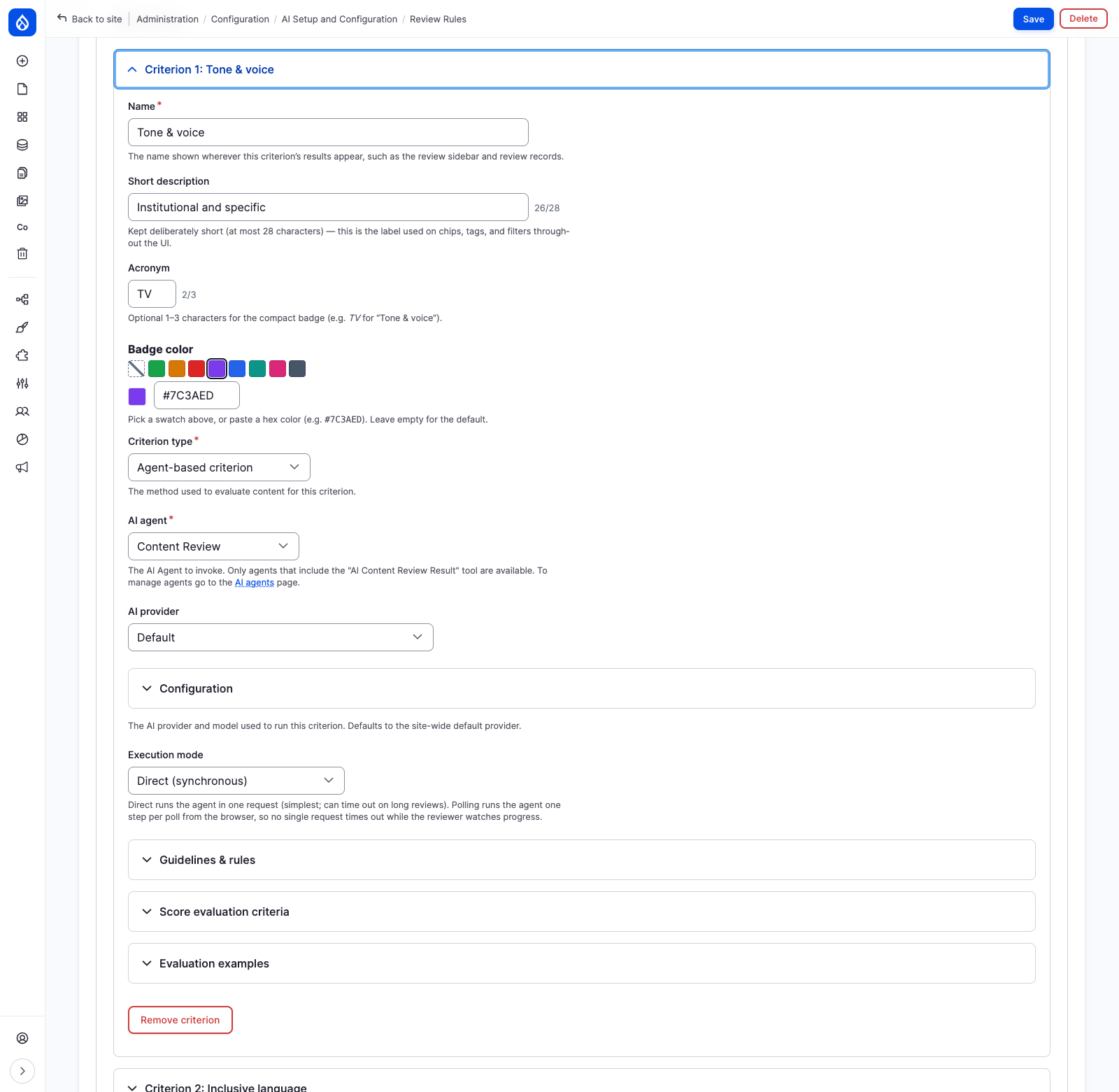
Step 3: configure each criterion
Identity
| Field | Required | Notes |
|---|---|---|
| Name | Yes | Shown wherever the criterion's results appear. |
| Short description | No | At most 28 characters. Used on chips, tags and filters. |
| Acronym | No | 1 to 3 characters for the compact badge, for example TV for Tone & voice. |
| Badge color | No | A swatch or a hex value such as #7C3AED. |
These four are presentational. They are stored outside the criterion's hashed configuration, so editing them never invalidates existing Review Records.
Criterion type
Agent-based is the type shipped with the module. It adds:
| Field | Notes |
|---|---|
| AI agent | The agent to invoke. Only agents carrying the AI Content Review Result tool appear. |
| AI provider | Provider and model for this criterion. Defaults to the site-wide default provider. |
| Execution mode | Direct runs the agent in one request. Polling runs one agent turn per poll from the browser, so no single request times out. Pick polling for long reviews or slow providers. |
| Guidelines & rules | The rubric sent to the AI verbatim. This is the only criterion-specific text the agent receives. |
Guidelines carry the whole question. Leave them empty and every criterion on the same agent asks the same thing. Write them the way you would brief a new teammate: what to look for, and what to flag.
Tone & voice: Judge whether the content sounds like our brand: warm, plain and
approachable. We write in second person, in the active voice, in short sentences.
We do not write like a contract, a policy manual or a warning label.
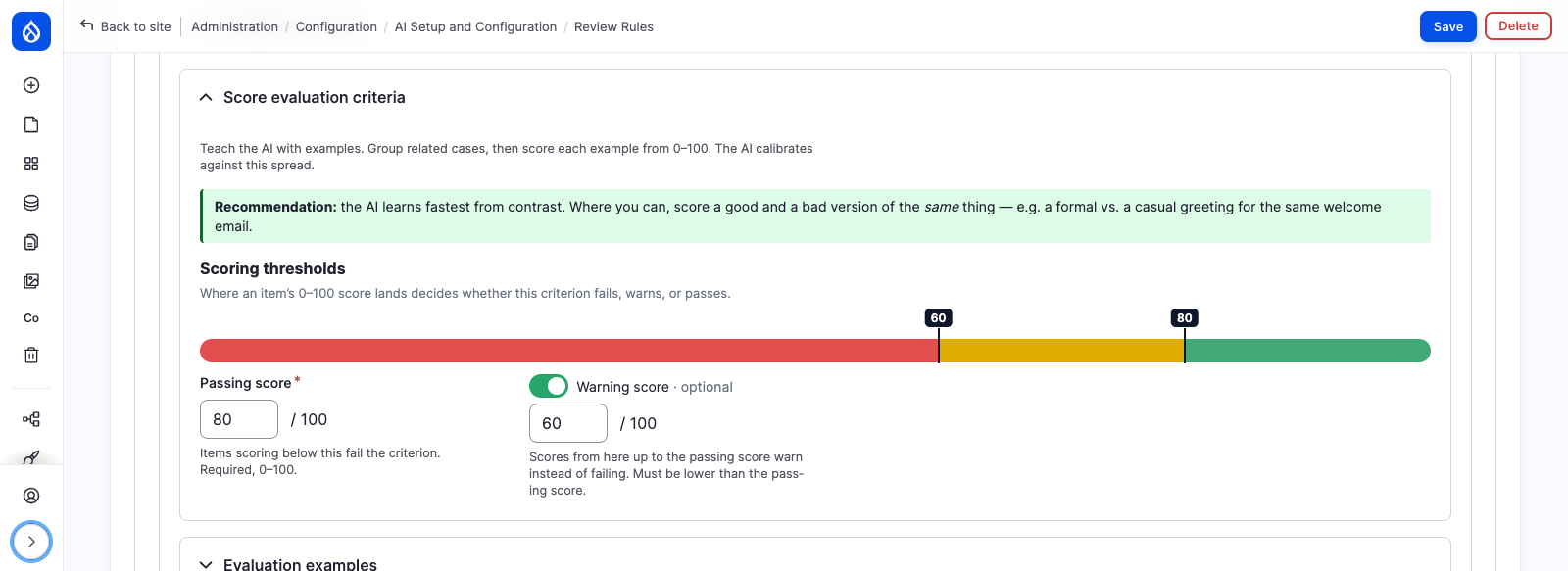
Score evaluation criteria
| Field | Required | Notes |
|---|---|---|
| Passing score | Yes | 0 to 100. Items scoring below this fail the criterion. |
| Warning score | No | Scores from here up to the passing score warn instead of failing. Must be lower than the passing score. |
Thresholds are applied by Drupal to the returned score. They are never sent to the AI. They are stored outside the hashed configuration, so raising or lowering one reinterprets records that already exist rather than orphaning them. A score equal to a threshold resolves to the higher grade. A criterion with no passing score is ungraded.
Evaluation examples
Scored examples calibrate the AI. They are grouped: each group's label is sent to the AI as an aspect to weigh, and a group needs at least two examples.
Example group Warmth, on a Tone & voice criterion:
| Score | Example | Why this score |
|---|---|---|
| 95 | "You can reset your password in about a minute. Here's how." | Second person, active voice, short and friendly. |
| 55 | "Passwords can be reset by users from the sign-in page." | Clear, but passive and impersonal. |
| 15 | "The account holder is solely responsible for maintaining the confidentiality of their credentials." | Reads like a contract. |
Examples calibrate best when they span the scale: a high anchor at 90 or above, a low anchor at 30 or below, and one near the passing score. Contrast helps most, so score a good and a bad version of the same message.
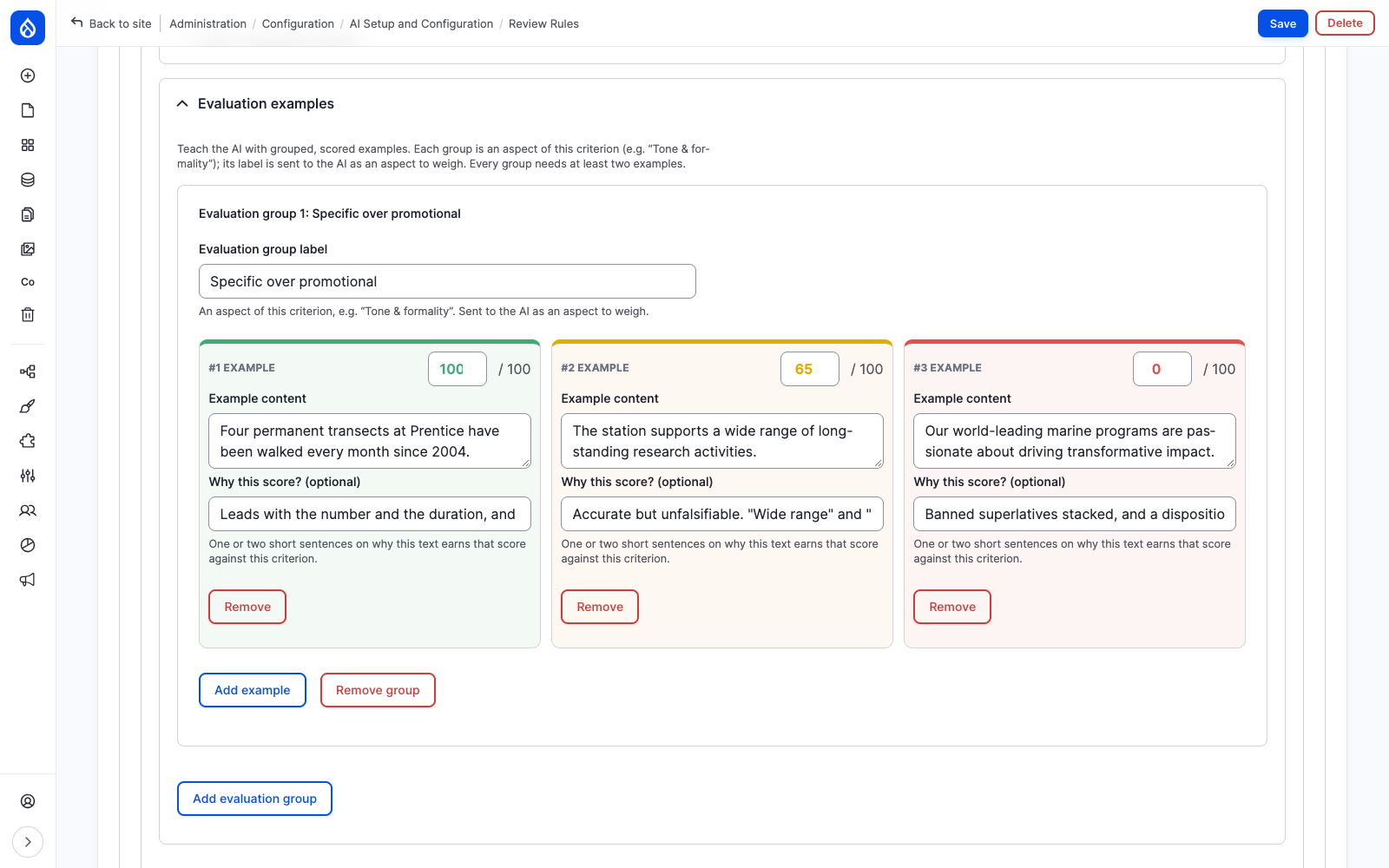
Examples live inside the criterion's hashed configuration, because they change what the AI is asked to do. Editing them invalidates prior results for that criterion.
Multiple rules on the same bundle
Several rules can target the same entity type and bundle. The review tab shows the union of every
matching rule's criteria. Two rules on node:article, one holding Brand voice and Legal
compliance and the other SEO and Reading level, give the article four criteria.
Enabling and disabling rules
A rule has an enabled status, flipped from the row operations on the rules listing. A disabled rule contributes no criteria, queues nothing on cron, and leaves its existing records in place.
Configuration storage
Rules are config entities stored as ai_content_review.rule.<id>. They export with your site
configuration and move between environments through drush config:export and drush config:import
like any other config.
Saving, deleting, enabling or disabling a rule rebuilds the router, because the per-entity review routes and the AI Review local task are derived from the active rules.