Base module
media_directories is the always-on foundation. It adds a directory field
to every Media entity and tells Drupal which taxonomy vocabulary plays the
role of "the folder structure". Every folder is a taxonomy term; nesting terms
gives you nested folders.
You'll typically enable this once, pick a vocabulary, and not revisit the settings page often.
Install
Dependencies: core media, media_library, taxonomy, views.
Set up your directory vocabulary
The directory tree is just a taxonomy. Before you wire it up you need a vocabulary to hold the folder terms. For most sites a dedicated vocabulary called something like Media directories is the cleanest setup — it keeps folder terms separate from any editorial taxonomies you already have.
- Go to Structure → Taxonomy → Add vocabulary and create the vocabulary.
- Open
/admin/config/media/media_directoriesand pick it under Taxonomy.
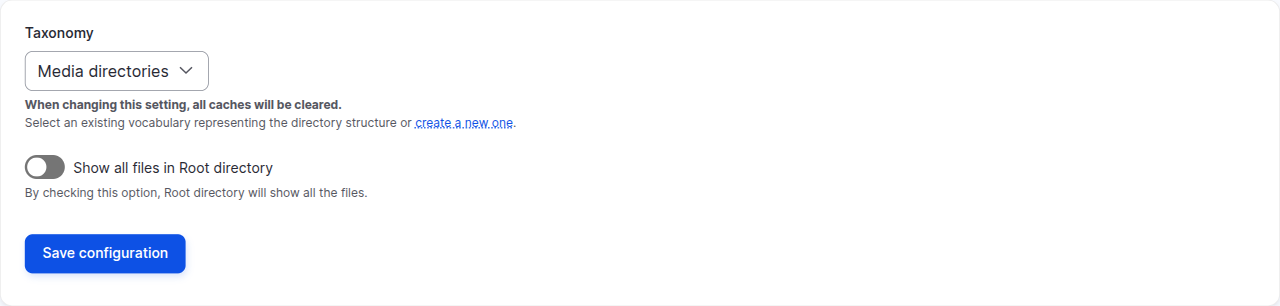
Configuration
The base module's settings page has two options.
Taxonomy
Selects which vocabulary represents your folders. Changing this triggers a full cache rebuild, because the directory field on Media entities is re-pointed at the new vocabulary.
Show all files in Root directory
Controls what editors see when they click Root in the sidebar:
- Off (default) — Root only shows media that hasn't been filed into any folder. Useful as a "needs filing" inbox.
- On — Root shows every media item on the site, regardless of folder. Handy when editors want a quick browse-everything view without first picking a specific folder.
For how editors work with folders day to day, see Features → Organising media in folders.
Verifying the install
/admin/config/media/media_directorieslists your vocabulary in the Taxonomy dropdown.- Any Media entity edit form now has a Directory field on it.
- Core's Media Library reflects the same directory the editor picked.
What's next
By itself, the base module just adds the directory field — there is no Vue.js browser, no CKEditor button, no AI features. Add submodules on top for the editing experience:
- Browser — Vue.js media browser, CKEditor 5 embed integration, and a field widget that opens the browser.
- File link — CKEditor 5 button for inserting file download links.
- AI — AI-generated alt text and AI translations.
- Image resize — physically resize inline images to the dimensions set in the editor.
- Compatibility — render legacy
<drupal-entity>embeds as<drupal-media>during migration.