Configuration
All configuration happens on the text format you want the AI tools to appear in. Nothing is global except the default prompts.
Add the toolbar buttons
- Go to
Administration > Configuration > Content authoring > Text formats and editors. - Edit a format that uses CKEditor 5, for example Full HTML.
- In the toolbar configuration, drag AI Assistant into the active toolbar. This is the dropdown that lists the AI actions.
- Drag AI Balloon Menu into the active toolbar as well if you want the same actions to appear next to selected text.
Add the buttons with a recipe
Recipes can add the buttons with the addItemsToToolbar config action. Unlike core's editor:addItemToToolbar, it accepts a list of items, so one action can add both buttons:
config:
  actions:
    editor.editor.full_html:
      addItemsToToolbar:
        - aickeditor
        - ai_balloon_menu
Each list entry is either a toolbar item name or a map with the same options as editor:addItemToToolbar (item_name, position, replace, allow_duplicate). Items already in the toolbar are skipped, and the AI Assistant plugin gets its default settings so you can configure the actions afterwards.
#3507570 adds the same action to Drupal core as editor:addItemsToToolbar. Until it lands, ai_ckeditor registers its own implementation under that ID; on core versions that already provide the action, ai_ckeditor stays out of the way and the core implementation is used. Recipes work unchanged either way.
Configure the AI Assistant actions in a recipe
The config action only adds the buttons; every AI action starts disabled. The AI Assistant settings live in the editor config under settings.plugins.ai_ckeditor_ai, so a recipe can enable and configure individual actions in the same step, for example with a simpleConfigUpdate action:
config:
  actions:
    editor.editor.full_html:
      addItemsToToolbar:
        - aickeditor
        - ai_balloon_menu
      simpleConfigUpdate:
        settings.plugins.ai_ckeditor_ai:
          dialog:
            autoresize: 'min-width: 600px'
            height: '750'
            width: '900'
            dialog_class: ai-ckeditor-modal
          plugins:
            ai_ckeditor_completion:
              enabled: true
              provider: ''
            ai_ckeditor_spellfix:
              enabled: true
              provider: openai__gpt-4o
            ai_ckeditor_translate:
              enabled: true
              provider: ''
              language_source: lang
              autocreate: false
              translate_vocabulary: ''
              use_description: false
Each action is keyed by its plugin ID: ai_ckeditor_completion, ai_ckeditor_help, ai_ckeditor_modify_prompt, ai_ckeditor_reformat_html, ai_ckeditor_spellfix, ai_ckeditor_summarize, ai_ckeditor_tone, and ai_ckeditor_translate. All of them take enabled and provider, where provider uses the AI module's <provider>__<model> format (for example openai__gpt-4o) and an empty string means the site's default chat provider. Translate additionally takes language_source (lang for site languages or tax for a vocabulary), translate_vocabulary, autocreate, and use_description; Tone takes tone_vocabulary, autocreate, and use_description. See config/schema/ai_ckeditor.schema.yml for the full reference.
The same structure applies if you ship a complete editor.editor.*.yml file in your recipe's config directory instead of using config actions.
Configure the AI tools
Once the AI Assistant button is active, an AI tools section appears under the CKEditor 5 plugin settings. Each action has its own collapsible panel.
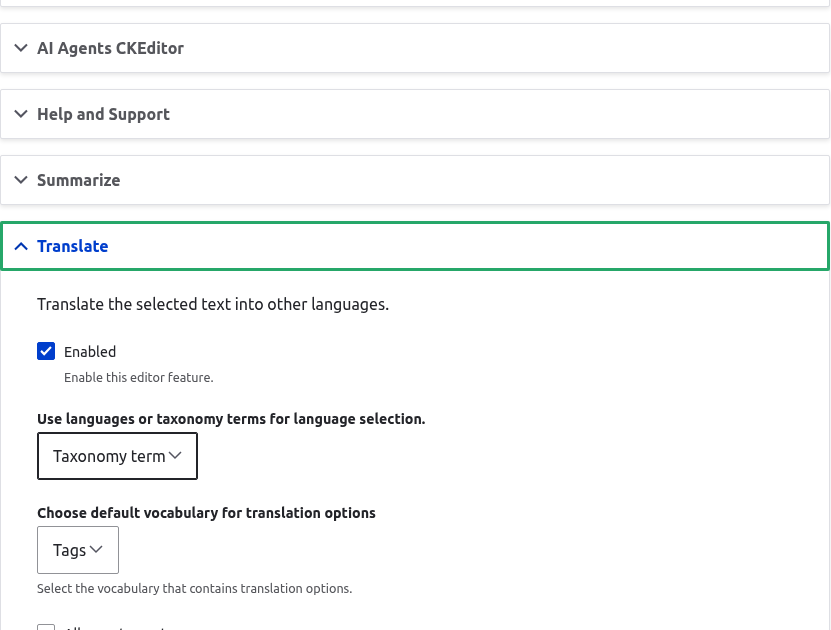
For each action you want to offer:
- Enabled: turn the action on for this format. Only enabled actions appear in the toolbar dropdown and the balloon menu.
- AI provider: pick the provider and model this action uses. Leave it on the default to use the AI module's default chat provider.
- Prompt: each action ships with a default prompt. Override it here if you want to change how the request is phrased. Prompts are stored as config entities under
ai.ai_prompt.*and the chosen prompt id is saved inai_ckeditor.settings.
Translate options
The Translate action has extra settings:
- Language source: choose whether the language list comes from the site's configured languages or from a taxonomy vocabulary.
- Vocabulary: when the source is a taxonomy vocabulary, pick which one holds the language terms.
- Allow autocreate: let editors add new terms to the chosen vocabulary from the dialog.
- Use term description for translation context: pass the term description to the model as extra context for the translation.
Tone options
The Tone action reads its tone list from a taxonomy vocabulary, with the same autocreate option. Configure the vocabulary in the action's panel.
Dialog appearance
The module ships a set of dialog options (width, height, autoresize, CSS class) that control the modal the actions open in. These live in the ckeditor5.plugin.ai_ckeditor_ai settings and can be adjusted per format if the defaults do not fit your theme.
Permissions
Grant Use AI CKEditor plugin to any role that should run the actions. This permission guards the /api/ai-ckeditor/* endpoints the plugins call. A user without it sees the buttons but gets no result.