AI CKEditor integration
AI CKEditor integration adds a set of CKEditor 5 plugins that let content editors send the text they are working on to an LLM and act on the result, from translating and summarizing to fixing spelling, adjusting tone, and completing text. Editors reach the actions from a toolbar button or from a contextual balloon menu that appears when they select text.
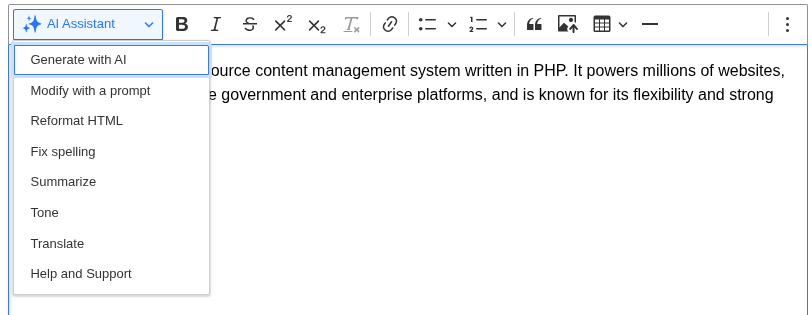
Key features
- Completion: generate new text from a prompt and insert it at the cursor.
- Modify with a prompt: give a free-form instruction to rewrite the selected text.
- Tone: rewrite the selection in a different tone.
- Translate: translate the selection into another language, sourced from site languages or a taxonomy vocabulary.
- Summarize: produce a shorter version of the selected content.
- Fix spelling: correct spelling and grammar in the selection.
- Reformat HTML: clean up the markup of the selected content.
- Help and Support: in-editor documentation of the available actions.
Each action is a separate plugin. You enable the ones you want per text format and pick which AI provider and model each one uses.
Moved out of AI core
This integration used to ship inside the AI (Artificial Intelligence) module on the 1.4.x branch. It now lives in its own project, and development continues here. See Installation for how to move an existing site over.
Requirements
- Drupal core CKEditor 5.
- The AI (Artificial Intelligence) module.
- At least one configured AI provider with a working API key. Without a provider the actions have nothing to call.