Configuration
Go to Administration » Configuration » Development » SCSS Compiler
(/admin/config/development/scss).
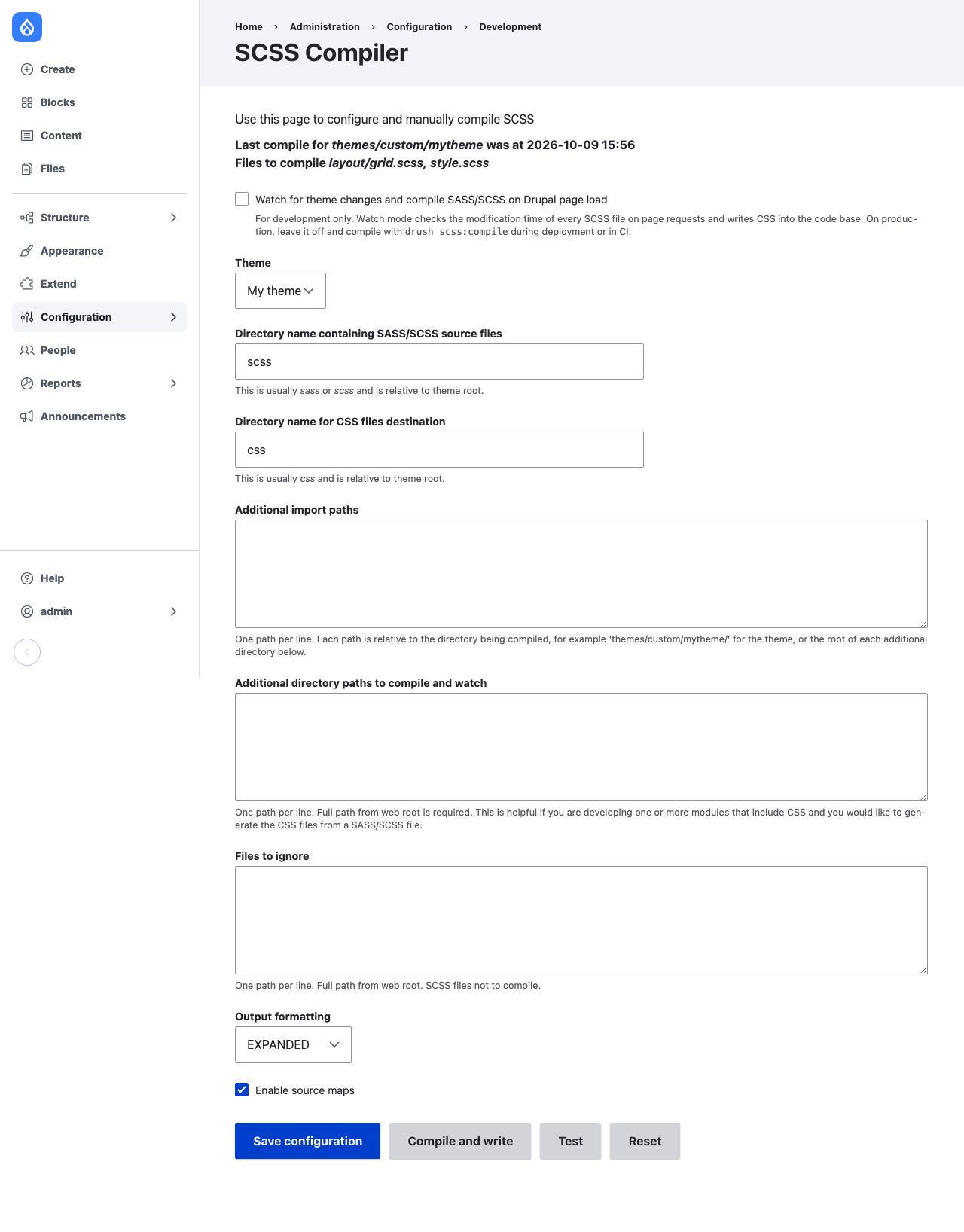
The top of the page shows when each directory was last compiled and which files will be compiled.
Directories
- Theme
- The theme to compile. Only installed themes are listed. If none is chosen, the site's default theme is used.
- Directory name containing SASS/SCSS source files
- The source directory, relative to the theme root and to each additional
directory. Default:
scss. - Directory name for CSS files destination
- The output directory, relative to the same roots. Default:
css. It is created if its parent is writable. - Additional directory paths to compile and watch
- One directory per line, relative to the Drupal root, for example
modules/custom/my_module. Each must contain the source directory named above, and its CSS is written to the output directory named above. - Additional import paths
- One path per line. Each path is relative to the directory being
compiled: for the theme,
libmeansthemes/custom/mytheme/lib; formodules/custom/my_module, it meansmodules/custom/my_module/lib. The source directory is always an import path. - Files to ignore
- One file per line, relative to the Drupal root, for example
themes/custom/mytheme/scss/print.scss. A leading slash is accepted.
Every path must stay inside the Drupal root: paths with .. or a stream
wrapper such as public:// are rejected.
Output
- Output formatting
EXPANDED(readable) orCOMPRESSED(minified).- Enable source maps
- Writes
NAME.css.mapnext to each CSS file and adds asourceMappingURLcomment to the CSS. Source paths in the map are relative to the map, so they work whether or not Drupal is served from a subdirectory.
Watch mode
- Watch for theme changes and compile SASS/SCSS on Drupal page load
- Turns on watch mode. See Usage.
- Compile while logged out
- Lets anonymous requests trigger the watch check too. Off by default.
- Minimum seconds between watch checks
- Watch mode checks for changes at most once in this many seconds. Default: 2. Set 0 to check on every request.
Buttons
- Save configuration
- Saves the settings and reports any directory that cannot be compiled.
- Compile and write
- Compiles every file with the values on the form, saved or not, and writes the CSS. It does not save the settings.
- Test
- Compiles every file with the values on the form and shows the CSS and its size on the page, without writing anything or saving the settings.
- Reset
- Restores the default settings.
Settings in code
All settings live in the scss.settings configuration object and can be
exported with the rest of the site's configuration. For example, to keep
watch mode off on production, in settings.php:
| Key | Type | Default |
|---|---|---|
active |
boolean | false |
compile_logged_out |
boolean | false |
check_interval |
integer | 2 |
theme_to_watch |
string | empty (default theme) |
scss_directory |
string | scss |
css_directory |
string | css |
output_formatting |
string | expanded |
source_maps |
boolean | true |
additional_import_paths |
string, one per line | empty |
additional_paths_to_watch |
string, one per line | empty |
files_to_ignore |
string, one per line | empty |