Create an individual Feature
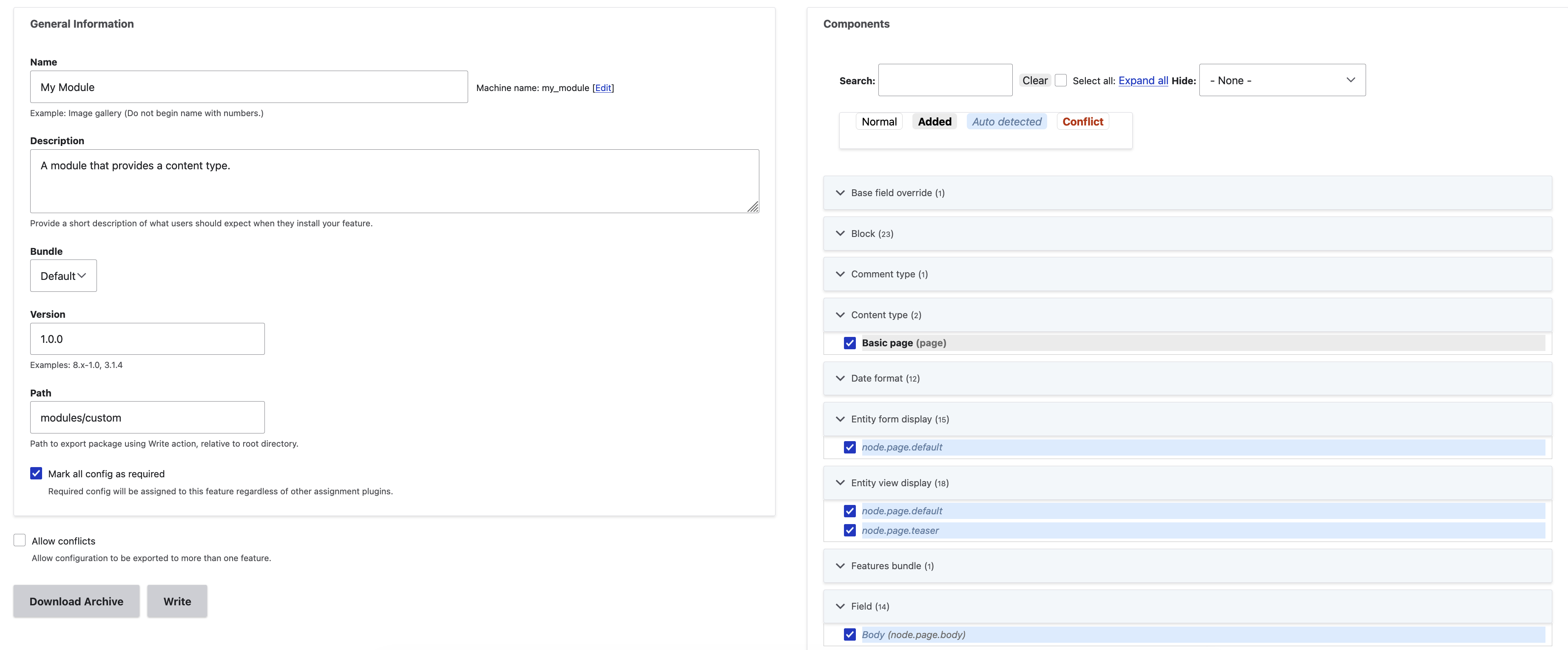
- Start at At Administration > Configuration > Development > Features (
admin/config/development/features). - Under "Bundle", select the bundle you wish to add the Feature to. (If necessary, create a new bundle first. See Create Features bundles.)
- Click "Create new feature".
- Under "Components", select the configuration items you want to add to your feature. When you select an item, other related items may be added automatically.
- To save your feature, click either "Download archive" or "Write".
Edit an existing Feature
To edit an existing feature:
- Ensure the Feature you want to edit is enabled.
- Start at At Administration > Configuration > Development > Features (
admin/config/development/features). - Under "Bundle", select the bundle for the Feature you want to edit.
- Click the title of the Feature you want to edit to bring up its edit form.
- Under "Components", add or remove components. Note that when you select an item, other related items may be added automatically.
- To save your feature, click either "Download archive" or "Write".
When you manually edit a Feature, information is automatically saved to the Feature listing the individual configuration items you have either added or removed. This is done so that, the next time you use Features' automatic generation, these changes will be respected.
Moving a Feature from one bundle to another
If you are working with multiple bundles, you may find the need to move a Feature from one bundle to another. For example, you may have first created an "article" Feature as part of the default bundle (no namespace) but now want to make article part of your "example" bundle.
To do so:
- Ensure the Feature you want to edit is enabled.
- Start at Administration > Configuration > Development > Features (
admin/config/development/features). - Under "Bundle", select the bundle for the Feature you want to edit.
- Click the title of the Feature you want to edit to bring up its edit form.
- Under "Bundle", change the selection to the new bundle you want to move the Feature to.
- To save your feature, click either "Download archive" or "Write".
You'll likely also want to:
- Disable the original feature.
- Enable the new one.