Configuration
Everything is on Configuration → Web services → Agent Surface
(/admin/config/services/agent-surface), on the edit form of each bundle, and
on the read-only Declared signals tab.
Permissions
| Permission | Grants |
|---|---|
| Administer Agent Surface (restricted) | The settings form, the Declared signals page, the llms.txt tab, and the AI usage signals section on bundle edit forms. |
| View site reports (core) | The request report at /admin/reports/agent-surface. |
The AI usage signals section on a content type, vocabulary or media type form, or on the account settings form, appears only for users with Administer Agent Surface, whatever permission the bundle form itself needs.
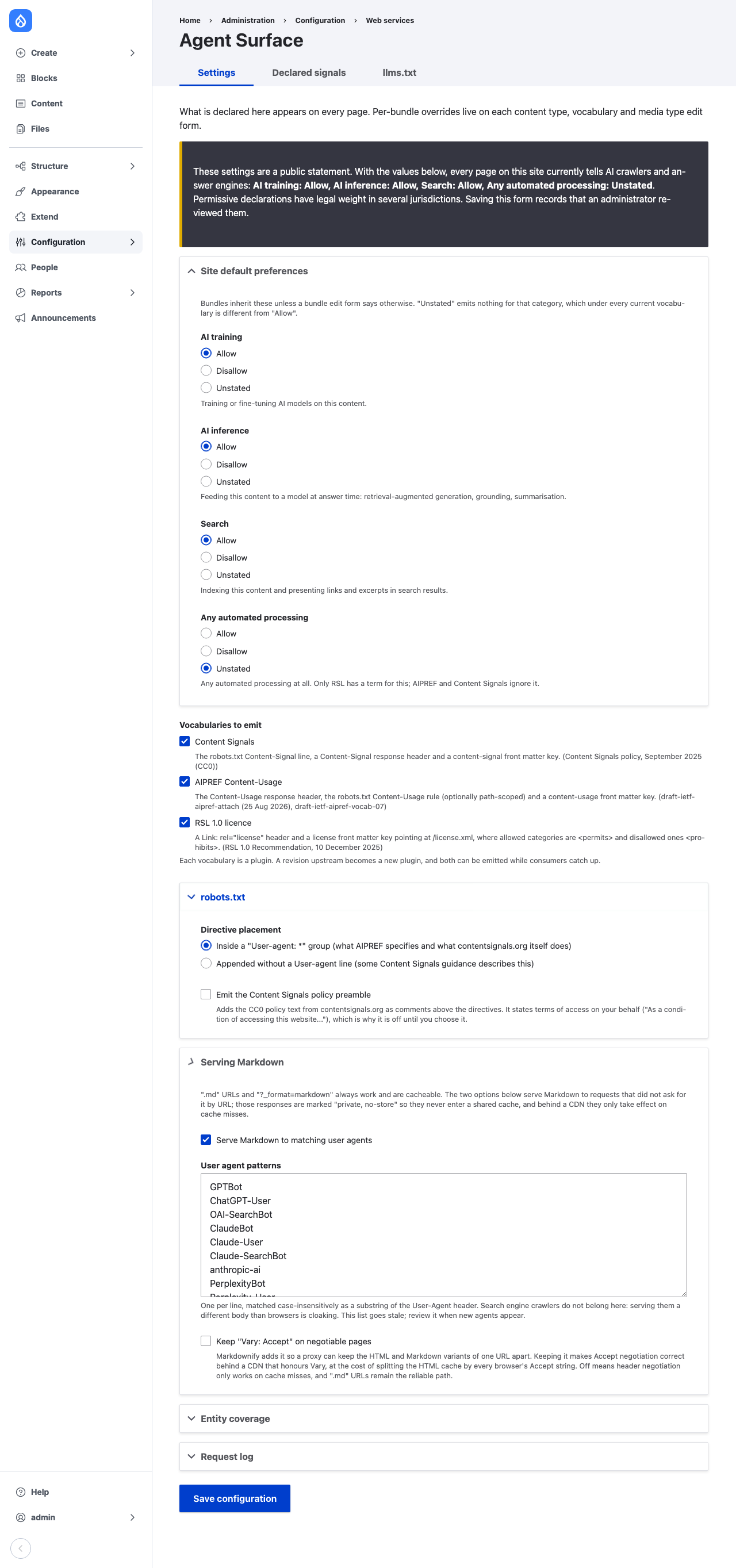
Site default preferences
Four categories, each Allow, Disallow or Unstated:
| Category | Covers |
|---|---|
| AI training | Training or fine-tuning AI models on the content. |
| AI inference | Feeding the content to a model at answer time: retrieval-augmented generation, grounding, summarisation. |
| Search | Indexing the content and presenting links and excerpts in search results. |
| Any automated processing | Any automated processing at all. Only RSL has a term for it. |
Unstated emits nothing for that category. Under every current vocabulary saying nothing is different from saying yes.
Saving the form also records that the defaults were reviewed, which clears the status report warning.
Vocabularies to emit
Each vocabulary is a plugin. Several can be enabled at once, so a site can emit an old and a new spelling while consumers catch up.
| Plugin | Spelling | Emits |
|---|---|---|
AIPREF Content-Usage (aipref_content_usage) |
draft-ietf-aipref-vocab-07: train-ai, search; values y/n |
Content-Usage header, robots.txt Content-Usage: rule (path-scoped where a bundle needs it), content-usage front matter key |
Content Signals (cloudflare_content_signal) |
search, ai-input, ai-train; values yes/no |
Content-Signal header, robots.txt Content-Signal: line, content-signal front matter key |
RSL 1.0 licence (rsl, from the RSL submodule) |
ai-train, ai-input, search, all in /license.xml |
Link: rel="license" header, license front matter key |
AIPREF has no term for retrieval-time use, so the AI inference category
reaches consumers only through Content Signals (ai-input) and RSL.
robots.txt
Directive placement: inside a User-agent: * group (what AIPREF specifies
and what contentsignals.org does) or appended without a User-agent line.
Emit the Content Signals policy preamble adds the CC0 policy text from contentsignals.org as comments above the directives. The text states terms of access on the site's behalf, so it is off until chosen.
Example output, with an Article override that disallows training under
/recipes/:
User-agent: *
Content-Usage: train-ai=y, search=y
Content-Signal: search=yes, ai-input=yes, ai-train=yes
Content-Usage: /recipes/ train-ai=n, search=y
License: http://kitchen.example/license.xml
Serving Markdown
.md URLs and ?_format=markdown always work. The two options here serve
Markdown to requests that did not ask for it by URL; those responses are
Cache-Control: private, no-store. See Usage.
- Serve Markdown to matching user agents, with the list of patterns, one
per line, matched case-insensitively as substrings of
User-Agent. The shipped list covers the main AI crawlers and fetchers. Search engine crawlers do not belong on it: serving them a different body than browsers get is cloaking. - Keep "Vary: Accept" on negotiable pages. Markdownify adds it; this
module strips it by default because on a shared CDN it splits the HTML cache
by every browser's
Acceptstring. Keep it only if the CDN honoursVaryand you wantAcceptnegotiation to work on cache hits.
Entity coverage
Nodes and taxonomy terms are exposed by Markdownify and configured on its settings page.
- Expose media entities (on by default) adds media to Markdownify's list.
- Expose user profiles (off by default). A profile is personal data, and a
text file at a predictable path makes harvesting
/user/*cheap. This setting overrides Markdownify's ownusersetting in both directions.
Request log
Enable the request log and Retention (days), 30 by default; cron deletes older rows. See Usage.
Per-bundle overrides
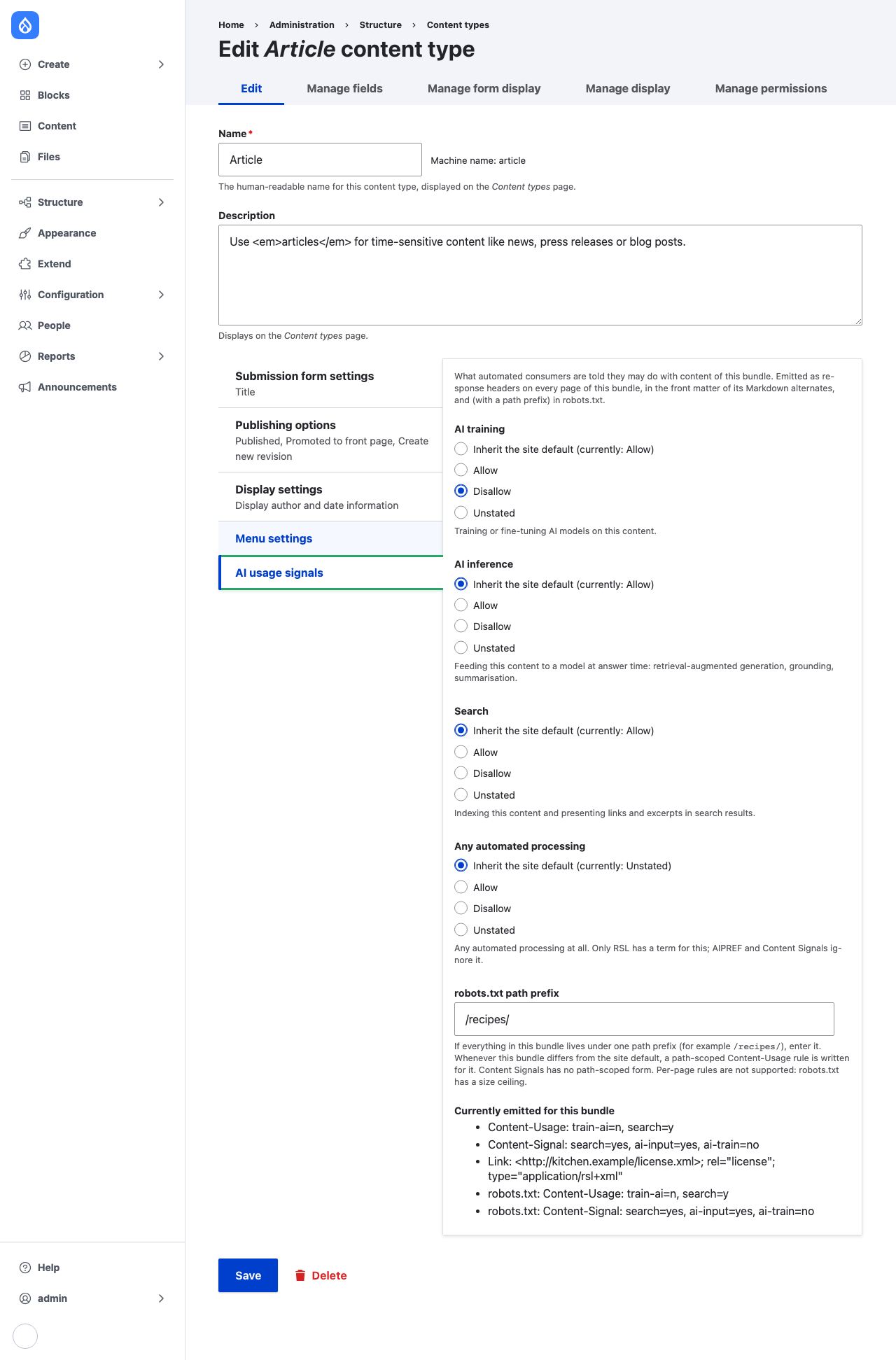
Each content type, vocabulary and media type edit form, and the account settings form for users, has a collapsed AI usage signals section. Each category can inherit the site default or override it. The section lists the exact strings emitted for the bundle.
robots.txt path prefix: if all of a bundle's content lives under one
prefix, such as /recipes/, enter it. Whenever the bundle differs from the
site default, a path-scoped Content-Usage rule and an RSL <content> block
are written for it. Content Signals has no path-scoped form. The prefix must
start with / and contain no whitespace or control characters; one that
arrives by configuration import without meeting that is skipped. Per-page
rules are not supported, because robots.txt has a size ceiling.
Setting every category back to inherit, with no prefix, deletes the override.
Declared signals
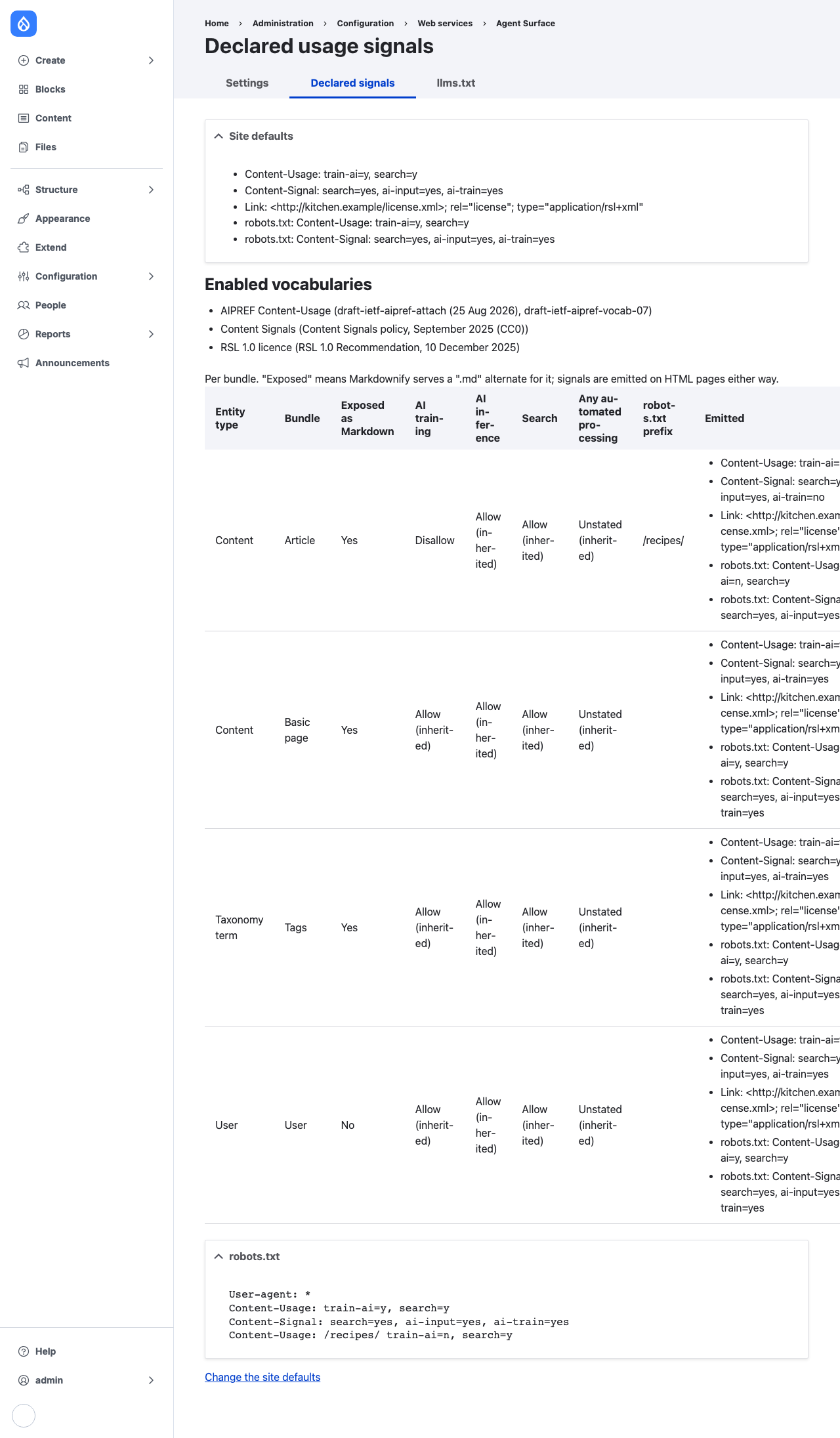
/admin/config/services/agent-surface/signals lists the site defaults, the
enabled vocabularies, every bundle with its effective signals and whether
Markdownify exposes it, and the robots.txt lines. It answers "what is this
site declaring?"